(4).Skip
Press the P- or P+ button to select the skip setting, and press the V- or V+
button repeatedly to select On or Off.
Setting to “On”, the channel will not be selected by Channel Up/Down keys.
(5).Sound SYS.
Press the P- or P+ button to select the Sound SYS. setting, and press the
V- or V+ button repeatedly to select .You could choose D/K,L,LL ,B/G or I
according to your local TV sound system.
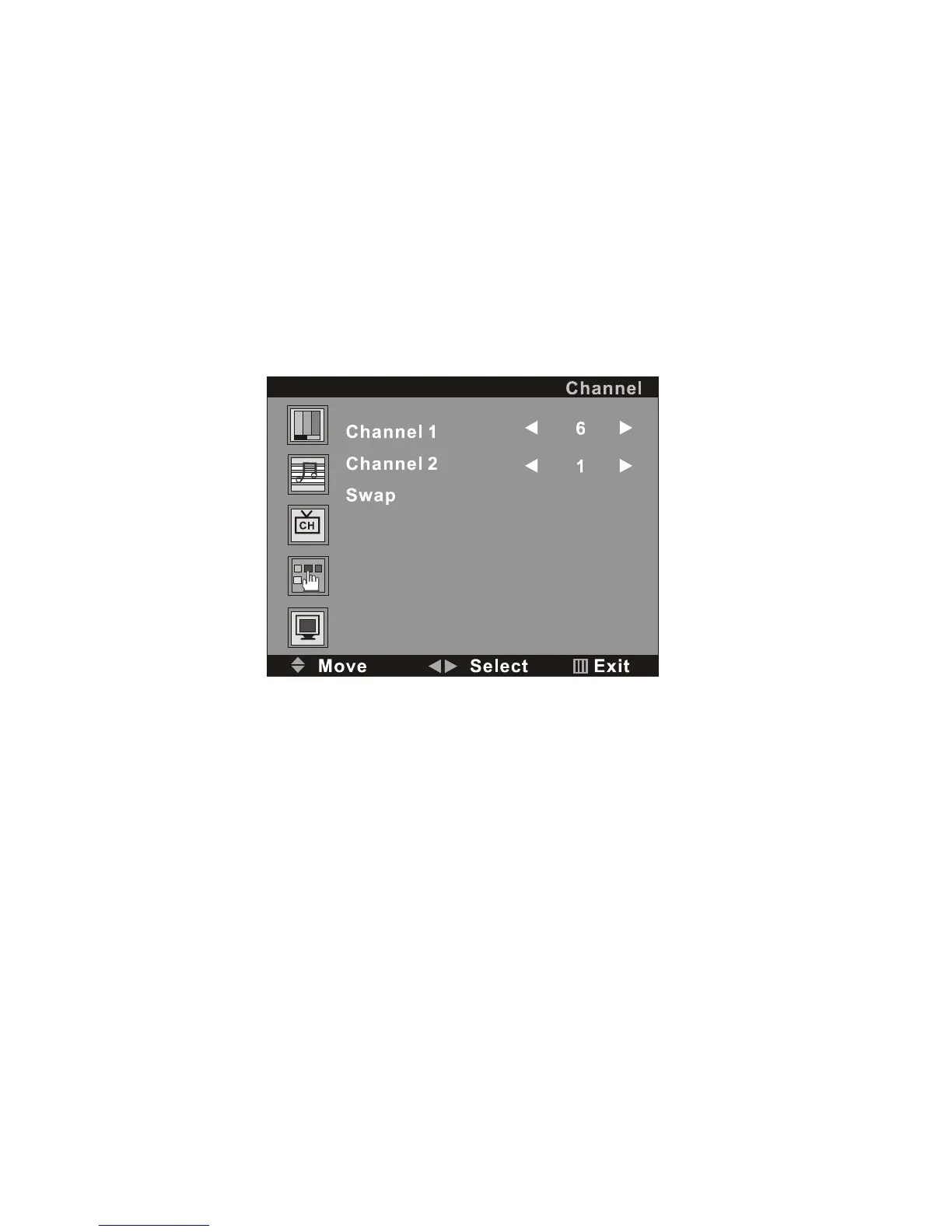
(6).Swap
Select the “Channel Swap”, and then press the V+ button, the screen will
display:
On the menu, the words “Channel 1” indicate the current station and 6 is
the station number; “Channel 2 ” means the destination station and 1 is the
station number. The TV is playing the current station (6). Press P- button
to keep the cursor on the line of “Channel 2”, you can enter into a station
number from 1-200 by the digit buttons 0-9 and the -/-- button as the
appointed station number (***) for replacing the current station number.
After entered into the number, press P- button again to move the cursor
will on the line of “ Swap”, then press V+ button, the TV will play the
programs of the appointed station (***).
After setting, press the MENU button to return to the root menu or exit the
setting menu.
4. FUNCTION SETTING



 To Next Page