EN
*Fu
h
l
a
ly
rg
c
i
h
n
a
g
r
:
g
th
ed
e
:
e
t
a
h
r
e
-b
e
u
a
d
r-b
LE
u
D
d
l
L
ig
E
h
D
t
l
s
ig
re
h
d
ts blue for 1 minute
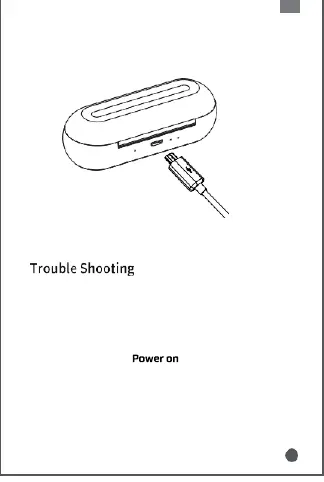
2. Charging the dock
*Charging: the charging case’s LED lights red
*
c
F
o
u
n
ll
t
y
in
c
u
h
o
ar
u
g
s
e
ly
d
.
: the charging case’s LED lights blue
F
re
o
c
ll
o
o
n
w
ne
b
c
e
t
l
i
o
n
w
g i
s
s
t
s
e
u
p
e
s
s
c
:
an resolve any pairing or
1
2.
M
Pu
a
t
k
t
e
h
s
e
u
e
r
a
e
r
b
-b
a
u
tt
d
e
s
ry
in
d
to t
k
he
ha
d
s
o
e
c
n
k
o
a
u
n
g
d
h
r
p
ec
o
h
w
a
e
r
r
g
;
ing for a
w
3.
h
F
il
o
e
l
;
low the steps of and Pairing of User
G
*I
u
f
i
a
d
b
e
o
.
ve steps still do not work, please take out both
e
1
a
0
r
s
-
e
b
c
u
s
d
t
s
o
o
t
f
u
t
r
h
n
e
o
d
ff
o
t
c
h
k
e
, p
e
r
a
e
r
s
-b
s
u
b
d
o
s
t
,
h
th
ea
e
r
n
-b
lo
u
n
d
g
s
p
b
r
u
e
t
s
t
s
on
bo
fo
th
r
e
a
a
u
r
t
-
o
b
m
ud
at
s
ic
b
a
u
l
t
ly
to
.
n, L&R will pair with each other
5


 To Next Page