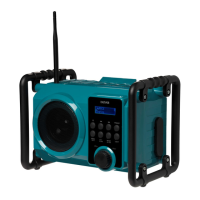
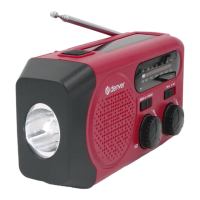
This document provides comprehensive instructions for the safe and effective use of your new device, a portable radio with Bluetooth capabilities. It is crucial to read these operating instructions thoroughly before initial use and to retain them for future reference. Should you pass the device on to another party, ensure these instructions are also provided.
Function Description
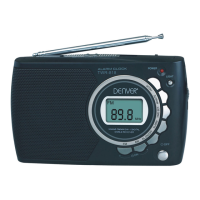
The device primarily functions as a radio, capable of receiving FM stations. It also offers sound playback from external devices via an AUX IN connection and supports Bluetooth operation for wireless audio streaming. The radio features a built-in battery for portable use, which charges automatically when connected to a power source.
Usage Features
Initial Setup and Power:
Before connecting the device to a power supply, allow it to reach room temperature if it has been moved from a cold to a warm environment, to prevent condensation damage. To power the device, insert one end of the power cable into the "DC IN" jack on the device and the other end into a 100-240V-50HZ wall outlet. The built-in battery will begin charging automatically, indicated by a flashing battery icon. Once fully charged, the icon will turn off. If the power cable is disconnected, the device will automatically run on its built-in battery. A flashing battery icon indicates a low battery.
Antenna Installation:
For optimal FM reception, screw the flexible rod antenna into the thread provided on the top of the device.
Switching On/Off:
Press the standby button to switch the radio on. Upon activation, the device defaults to FM mode with a volume level of 5.
Radio Operation (FM Mode):
To enter FM mode, repeatedly press the SOURCE button until "FM" and the current frequency appear on the display. The radio will automatically play the last station you listened to when switched on.
Searching for FM Stations:
- Automatic Search and Store (AMS): To automatically search for and store stations, press and hold the AMS button. The device will search for strong signals and store up to 20 FM stations. The station preset number (e.g., P01) will briefly appear on the display as stations are stored.
- Manual Tuning: To tune to a radio station, press and hold the previous or next button. For fine-tuning, briefly press the previous or next button to change the frequency incrementally.
Storing Stations Manually:
- Ensure the device is in FM mode by pressing the SOURCE button until "FM" appears.
- Use the previous or next button to select your desired station.
- Press and hold the MEM button; the preset number will flash on the display.
- Use the previous or next button to select a desired preset number.
- Press the MEM button again to complete the saving process.
Calling Up Stored Stations:
Repeatedly press the MEM button to cycle through and call up your desired station presets.
Sound Playback from External Devices (AUX IN):
The AUX IN connection allows you to play audio from external devices like MP3 players through the radio's loudspeakers.
- Switch off your external device.
- Access the AUX IN jack by turning the storage lock on the rear of the device towards the unlock icon.
- Plug one end of a 3.5 mm audio cable into the AUX IN jack on the device.
- Connect the other end of the audio cable to your external device's AUX/LINE OUT port.
- Switch on the radio and press the SOURCE button until "AUX" appears on the display.
- Switch on your external device, and its sound will play through the radio's loudspeakers.
- For protection against water splashes and dirt, you can place your external device into the storage compartment and close the storage cover by turning the storage lock towards the lock icon.
Bluetooth Operation:
- Press the SOURCE button until "bt" appears on the display. The Bluetooth icon will flash.
- On your Bluetooth-enabled device, enable Bluetooth and search for available devices.
- Select "WRB-50" from the list to initiate pairing and connection. If prompted, enter the default password "0000".
- Upon successful connection, the device will announce "audio device connected" (or "audio device disconnected" if disconnected). The Bluetooth icon will stop flashing, and "bt" will begin to flash.
- Play audio on your Bluetooth device. If playback is paused, "bt" will flash.
Maintenance Features
Device Placement and Environment:
To ensure safe operation and longevity of the device, observe the following guidelines:
- Maintain at least 10 cm clearance around the sides and top of the device if placed in an enclosed space like a rack.
- Avoid exposing the device to direct heat sources such as heaters or direct sunlight.
- Do not expose the device to extreme temperatures.
- Keep the device away from strong magnetic fields, such as those produced by televisions or other loudspeakers.
- Never place naked flames, like lit candles, near or on the device.
- Do not place any liquid-filled containers (e.g., vases) on or next to the device, as spills could impair electrical safety.
General Care:
The device is designed with an IPX4 protection class, meaning it is protected against damage from water ingress (splashing water). However, it is still advisable to prevent excessive exposure to liquids. The type plate, containing important device information, is located on the underside of the machine.

 Need help?
 General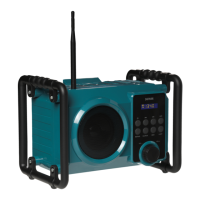

 To Next Page