6
OPERATIONS
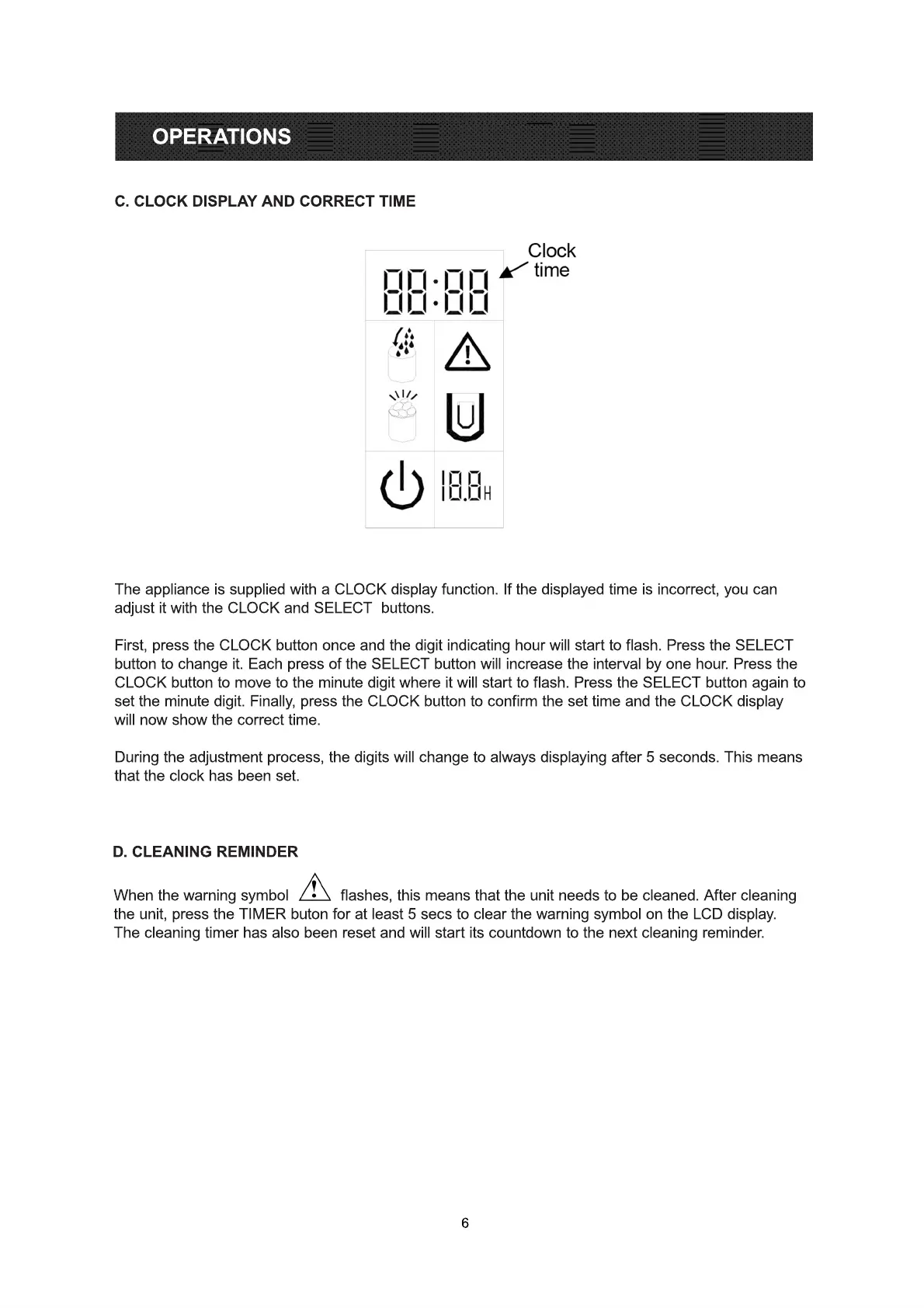
The appliance is supplied with a CLOCK display function. If the displayed time is incorrect, you can
adjust it with the CLOCK and SELECT buttons.
First, press the CLOCK button once and the digit indicating hour will start to flash. Press the SELECT
button to change it. Each press of the SELECT button will increase the interval by one hour. Press the
CLOCK button to move to the minute digit where it will start to flash. Press the SELECT button again to
set the minute digit. Finally, press the CLOCK button to confirm the set time and the CLOCK display
wwill now show the correct time.
During the adjustment process, the digits will change to always displaying after 5 seconds. This means
that the clock has been set.
When the warning symbol flashes, this means that the unit needs to be cleaned. After cleaning
the unit, press the TIMER buton for at least 5 secs to clear the warning symbol on the LCD display.
The cleaning timer has also been reset and will start its countdown to the next cleaning reminder.
C. CLOCK DISPLAY AND CORRECT TIME
D. CLEANING REMINDER



 To Next Page