DEVIreg™ Smart
13Installation Guide
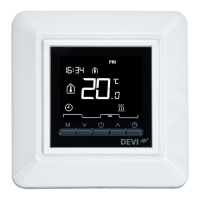
Nr. Type Description
1 Button/Symbol Control button
2 Button/Symbol Arrow Up button
3 Button/Symbol Arrow Down button
4 Symbol 3 digit 7 segment numbers with
comma separator
Symbol indications
Indication Mode/State Description
Blue - blinking Access Point
Mode
Thermostat ready for set-up
Blue Access Point
Mode
Smart phone connected
directly to thermostat for
set-up
Red - blinking Fault state Displays Error code
Red - slow
pulsing
Active Mode Indicating heating the floor
(Relay on)
Green -
constant
Active Mode Thermostat active and con-
nected to WiFi(Relay off)



 To Next Page