2827
| EN |
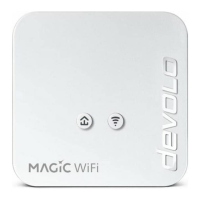
PLC button
PLC LED The devolo Magic WiFi mini adapter ... LED behaviour
Duration of the
button press
Action LED behaviour
Lights up white
Quickly fl ashes white
Lights up white and then briefl y
fl ashes red
Lights up red
None
Slowly fl ashes white
Alternately fl ashes white and red
1 second
> 10 seconds
Start pairing with other devolo Magic adapters
(on Wi-Fi adapters: start Confi gSync)
... is working perfectly. It is connected to other devolo
Magic adapters.
... is currently establishing a pairing connection with
another adapter.
... has a poor Powerline connection.
... is currently in the start-up process.
... cannot see any other devolo Magic adapters.
... no longer has any LED function since it was disabled by
the user.
... is not connected to the network*
... is in standby mode.
... is currently undergoing a software update.
Reset devolo adapter to factory settings
Flashes white
Lights up red
Flashes red
Wi-Fi button
Wi-Fi LED The devolo Magic WiFi mini adapter ... LED behaviour
Duration of the
button press
Action
... has a fault-free connection to the Internet.
LED behaviour
Lights up white
Flashes white
O
1 second
> 3 seconds
WPS function is being carried out
... is attempting to establish a connection via WPS.
... no longer has any LED function since it was disabled by
the user.
* On page 43 you will see how to carry out manual pairing.
Wi-Fi is being switched o
Flashes white
LED goes out
i
Wi-Fi frequency range
This device uses only channels in the 2.4 GHz frequency range for Wi-Fi.












 To Next Page
