
 Need help?
Do you have a question about the Devolo Magic Series and is the answer not in the manual?
Essential safety and operating instructions for first-time use and future reference.
Automatic network establishment within 3 minutes after plugging in adapters.
Steps to add a new adapter to an existing network using shared password methods.
Procedure to reset an adapter to factory defaults, including data loss warning.
Explains the meaning of LED status lights (Red LED) during start-up and after reset.
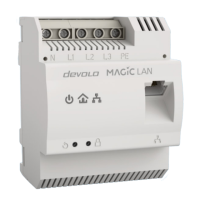
Guides on connecting and integrating the devolo Magic 2 LAN 1-1 into a network, including safety warnings.
Step-by-step guide for automatic setup of a new devolo Magic network using the Starter Kit.
Instructions for adding a new adapter to an existing devolo Magic network via shared password.
Methods for changing the network password using the web interface or devolo Cockpit/Home Network App.
Instructions for initial login, password assignment, and preventing unauthorized access.
Functions and information on Powerline network setup and adapter pairing.
Making changes to network settings in the LAN area, including IPv4 and IPv6 configuration.
Configuring settings for security and other device functions, including system information and password.
Setting a login password for the web interface to protect against unauthorized access.
Information on checking for and installing firmware updates automatically or manually.
Steps to manually update the firmware by downloading a file from the devolo website.
Instructions for restarting the devolo Magic adapter or restoring it to factory default settings.
Procedure to remove an adapter from the network and restore its configuration to factory defaults.
 General
| Type | Powerline adapter |
|---|---|
| MIMO | Yes |
| Operating Voltage | 100-240 V |
| Operating Frequency | 50/60 Hz |
| WiFi Standard | IEEE 802.11ac |
| Maximum Speed | 1200 Mbps |
| Ports | 1 Gigabit Ethernet |
| Encryption | 128-bit AES |
| Standards | IEEE 802.3 |
| Frequency Band | 2.4 GHz / 5 GHz |











 To Next Page