Configuration 26
devolo Magic 2 LAN
1-1
4.2.2Powerline
In the Powerline area, you will find functions and
information on the topic of Powerline and adapter
pairing.
In order to use a new devolo Magic 2 LAN
1-1
in
your devolo Magic network, first you have to
connect it to your existing devolo Magic adapters
devices as a network. This is accomplished by using
a shared password. This can be assigned in diffe-
rent ways:
b Using devolo Cockpit or the
devolo Home Network App (see Chapter 3.4
Installation of devolo software),
b Only using the PLC/reset button (see Chapter
2.3 Pairing and 3.3 Connecting the
devolo Magic 2 LAN
1-1
)
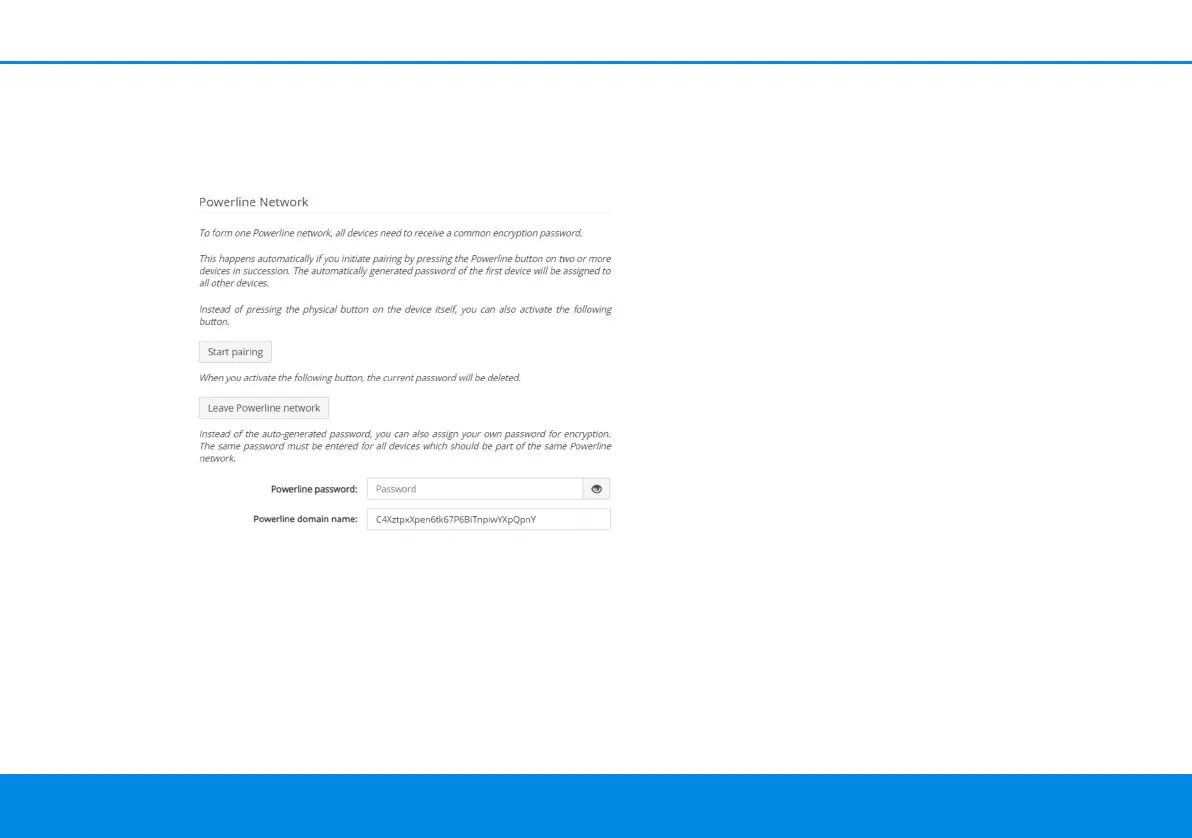
b Using the web interface, in the Powerline
menu; as described below:
Pairing – Using physical button and on-screen
button
1 First, press the PLC/reset button on a
devolo Magic adapter in your existing network.
2 Then, click Start pairing to start the pairing
operation. This may take some time.
As soon as the new devolo Magic adapter is inte-
grated into your existing network, it appears in a
list of available and established connections (see
Chapter Connections).
Pairing – Using custom password
You can also assign your network a custom PLC
password you pick yourself. Enter this password for
each devolo Magic adapter in the Powerline
password field and confirm your entry with OK.












 To Next Page