ENGLISH
18
LEVEL OF CHARGE
CHARGE INDICATOR
LEDCOLOR
25% - 50% White
≤25% White
Low battery shutdown White and blinking
Handle Folding Indicator (Fig.U)
The handle folding indicator
15
will illuminate when the
single touch handle
1
is not engaged in the operating
position when the safety key
6
and battery pack
26
are
installed, and the bail handle
8
is pulled. To clear the
handle folding indicator
15
, refer to the Raise the Single
Touch Handle section inthismanual.
Cutting Load Meter Indicator (Fig.U)
The cutting load meter indicator
14
will illuminate white,
yellow or red when mowing.
• White indicates a low cutting load.
• Yellow indicates a medium cutting load.
• Red indicates a high cutting load. Runtime will be
reduced if there is a prolonged high load while mowing.
Overheat Indicator (Fig.U)
• The overheat indicator
13
will illuminate amber and
then blink when the battery or motor is overloaded
during operation.
• The overheat indicator
13
will illuminate red and then
blink when the module has reached a high temperature.
• To clear the overheat indicator
13
, allow the battery and
mower
to cool down. When cooled, restart the mower
and
resume cutting with the mower deck sethigher.
Blade Sharpening Indicator (Fig.U)
The blade sharpening indicator
16
will illuminate when
the blades need service. Sharpen or replace the blades, refer
to the Blade Sharpening section inthismanual.
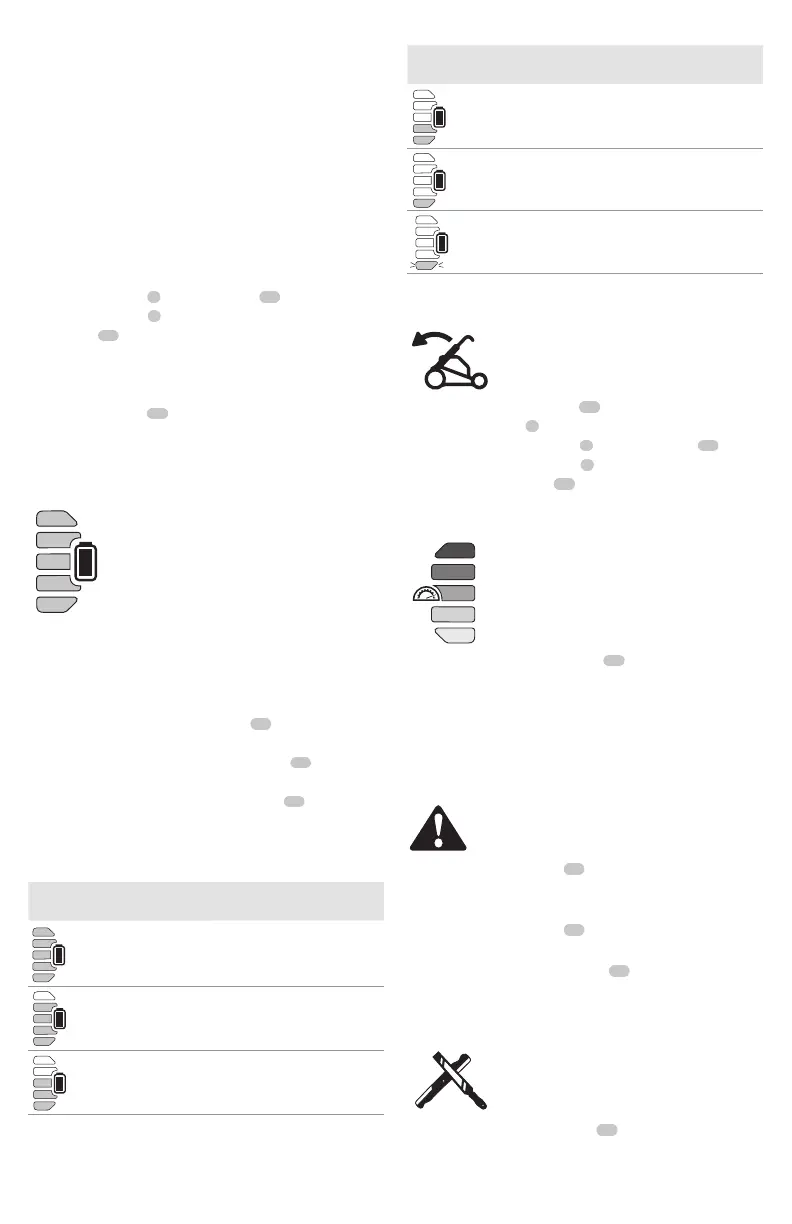
LED Dashboard Indicators (Fig.A, U)
The LED dashboard
12
contains the state of
chargeindicator, load meter indicator, temperature
indicator, handle folding indicator, blade sharpening
indicator and reset button.
State of Charge Indicator (Fig. U)
The DCMWP600 and DCMWSP650 are equipped with a
state of charge indicator. This will display the current level
of charge in the battery during use. It does not indicate tool
functionality and is subject to variation based on product
components, temperature and end-userapplication.
• The state of charge indicator LEDs
18
will illuminate,
indicating the percent of charge in the battery.
• When all 5 state of charge indicator LEDs
18
illuminate,
the battery is fully charged.
• When one state of charge indicator LED
18
illuminates,
charge is low and then it will flash when the battery
isdischarged. Remove thebattery and charge it.
State of Charge Indicator LED Status
LEVEL OF CHARGE
CHARGE INDICATOR
LEDCOLOR
100% - 85% White
70% - 85% White
50% - 70% White
Safety Key (Fig. T)
DANGER: Sharp moving blade. In order to prevent
accidental start‑up or unauthorized use of your
cordless mower, a removable safety key has been
incorporated into the design of your mower. The mower
will be completely disabled when the safety key has
been removed from themower.
DANGER: Rotating blades can cause serious
injury. To prevent serious injury, turn unit off and
remove safety key and battery pack when unattended,
or when charging, cleaning, servicing, transporting,
lifting, or storingmower.
1. Insert safety key
6
into the key slot
50
, located on
the main handle
4
, until it is fully seated inside of the
keyslot
50
as shown in Fig. T.
2. The mower is now operational.


 To Next Page