02
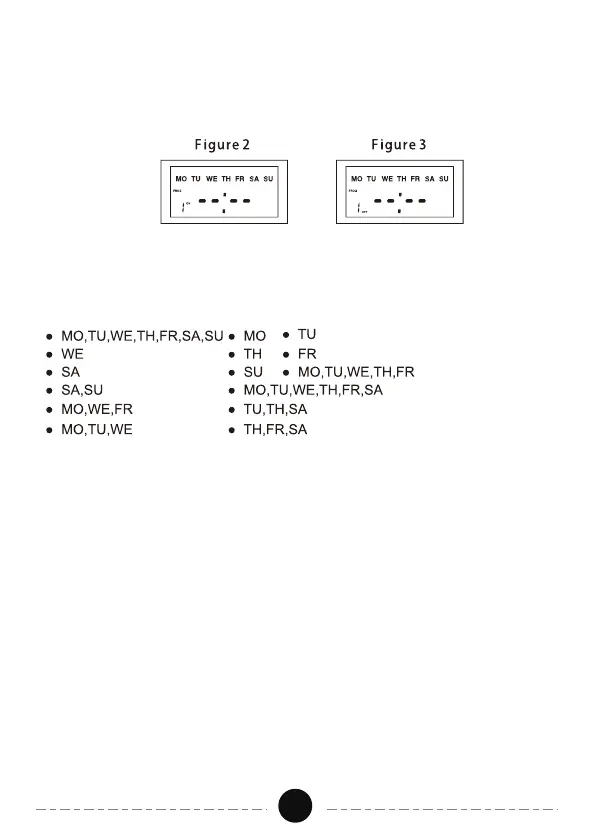
a. Press the "PROG" button and Figure 2 will appear. There are a total of
20 ON/OFF settings.
3. ON/OFF Program Setting
b. Press the "HOUR" and the "MINUTE" button to set the ON time.
c. Press the "WEEK" button to select the day of the week that the timer will
be on.
d. Press the "PROG" button to save the ON time settings and proceed to the
screen displaying "1 OFF". See Figure 3
e. Repeat steps b-d to set the OFF time. Press the "PROG" button again to
enter the other 19 ON/OFF settings.
Note: Timer should operate in the “AUTO ON” or “AUTO OFF” mode.
See “Switching Mode Indication” section.
4. "PROG" and "RST/RCL" Buttons
a. Press the "PROG" button to select the different 20 ON/OFF settings that
need to be changed.
b. During the ON/OFF time setting, press the "RST/RCL" button to reset the
ON/OFF time, which is currently being set. See Figure 4.


 To Next Page