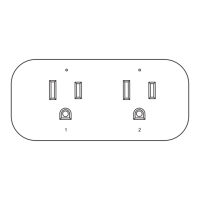
Cancel all the programming so that no remote transmitter can control the receiver:
1. Plug the receiver into one outlet.
2. Press the program button on the receiver for about 9 seconds until the
purple indicator light turns on and starts to flash. (Note: The color of the
indicator light changes from blue-red-purple.)
3. Release the program button, and then press it again, the indicator light
will turn off and all programming will be cancelled.
Cancelling all the programming of one receiver
03
Remote control outlets adopt variable learning codes technology.The codes
will be changed each time after re-programming. If this remote control outlet
happens to be in the same channels with other RF remote devices, just
re-program it and the interference will be eliminated.
No Interference
If you find the receivers works abnormally or the indicator on the remote
control becomes dim, please replace the battery.
- Open the battery compartment and remove the old battery.
- Install a new CR2032 battery, making sure the polarity + / - of the battery
is correct.
- Close the battery compartment.
Battery Replacement
- Input voltage: 125VAC 60Hz
- Maximum current: 15A resistive
(Note: When jack 1 and jack 2 are used at the same time, the sum of the current
of the two loads should not exceed 15A)
- Transmission frequency: 433.92MHz
- Remote control battery: 3V CR2032
Specifications
This device complies with Part 15 of the FCC rules. Operation is subject to
the following two conditions:
FCC STATEMENT
8A tungsten lamp


 To Next Page