3
Award BIOS Setup Utility
33
ROM PCI/ISA BIOS
STANDARD CMOS SETUP
AWARD SOFTWARE, INC.
HARD DISKS
Primary Master
Primary Slave
Secondary Master
Secondary Slave
TYPE
Auto
Auto
Auto
Auto
SIZE
0
0
0
0
CYLS
0
0
0
0
HEAD
0
0
0
0
PRECOMP
0
0
0
0
LANDZ
0
0
0
0
SECTOR
0
0
0
0
MODE
Auto
Auto
Auto
Auto
Drive A : 1.44M, 3.5 in.
Drive B : None
Video : EGA/VGA
Halt on : All Errors
Base Memory : 640K
Extended Memory : 64512K
Other Memory : 384K
Total Memory : 65536K
PU/PD/+/- : Modify
↑↓→←
: Select Item
: Change(Shift)F2
:
:
:
:
Esc
F10
: Quit
: Save & Exit Setup
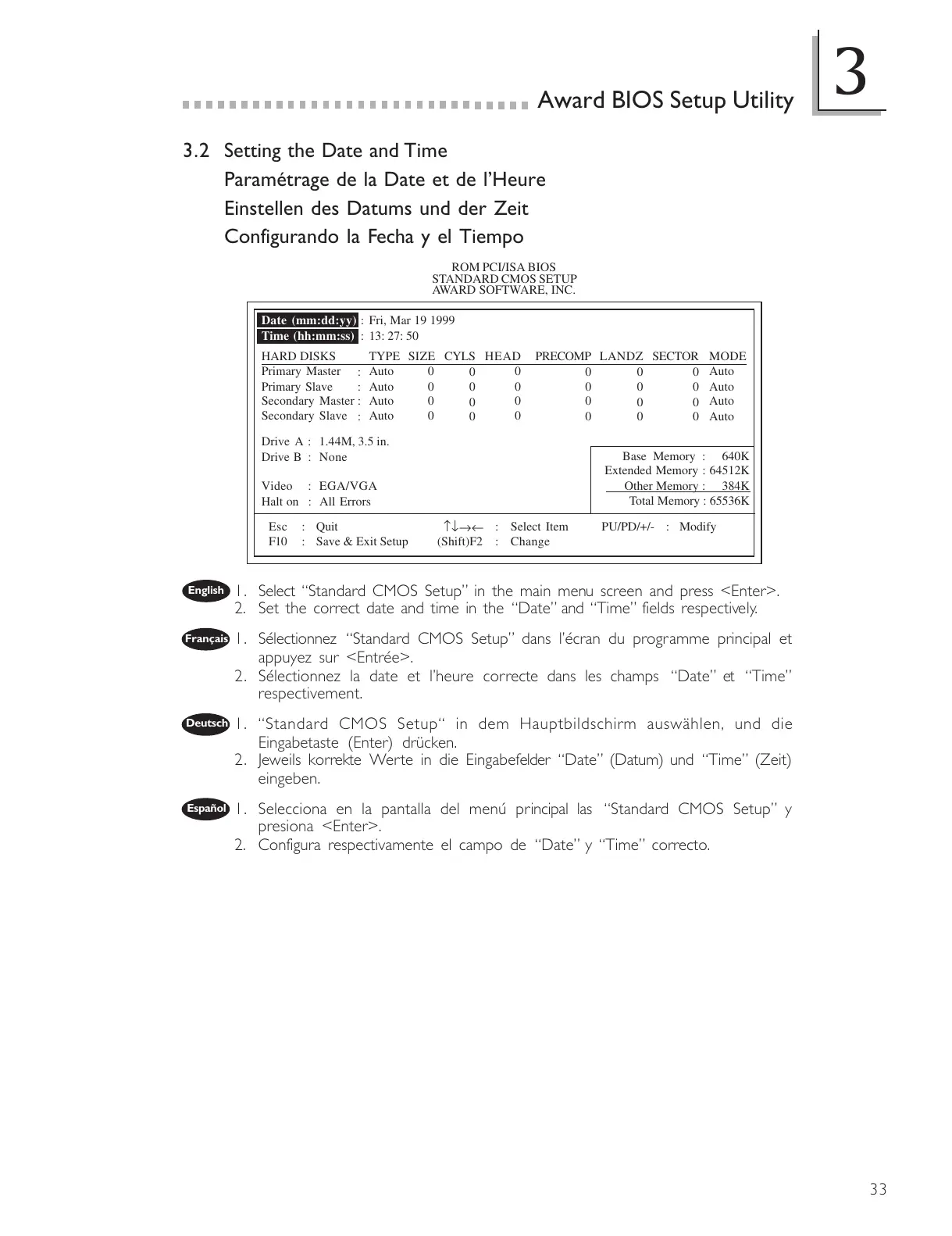
3.2 Setting the Date and Time
Paramétrage de la Date et de lHeure
Einstellen des Datums und der Zeit
Configurando la Fecha y el Tiempo
1. Select Standard CMOS Setup in the main menu screen and press <Enter>.
2. Set the correct date and time in the Date and Time fields respectively.
1. Sélectionnez Standard CMOS Setup dans lécran du programme principal et
appuyez sur <Entrée>.
2. Sélectionnez la date et lheure correcte dans les champs Date et Time
respectivement.
1. Standard CMOS Setup in dem Hauptbildschirm auswählen, und die
Eingabetaste (Enter) drücken.
2. Jeweils korrekte Werte in die Eingabefelder Date (Datum) und Time (Zeit)
eingeben.
1. Selecciona en la pantalla del menú principal las Standard CMOS Setup y
presiona <Enter>.
2. Configura respectivamente el campo de Date y Time correcto.
English
Français
Deutsch
Español
Date (mm:dd:yy) : Fri, Mar 19 1999
Time (hh:mm:ss) : 13: 27: 50



 To Next Page