6
2. How to play a game on Pegasus
Explanation of the LED rings
The ashing LED rings are used to conrm your moves and indicate the opponent’s moves. When you
make a move, the square where you are moving the piece will light up briey. Pegasus lets you know
that the board has recognised your move. Your move is also communicated to the online platform
you are playing on. The counter-move of your opponent is indicated by the alternating blinking of the
starting square and the target square. Move your opponent’s piece to the target square and the squares
will stop ashing. Now you can make your next move.
Making the opponent’s move in your own time
Please note that the time taken to move your opponent’s piece is deducted from your playing time. As
soon as your opponent’s move is received by the DGT Chess app, your turn begins and your time starts
counting down.
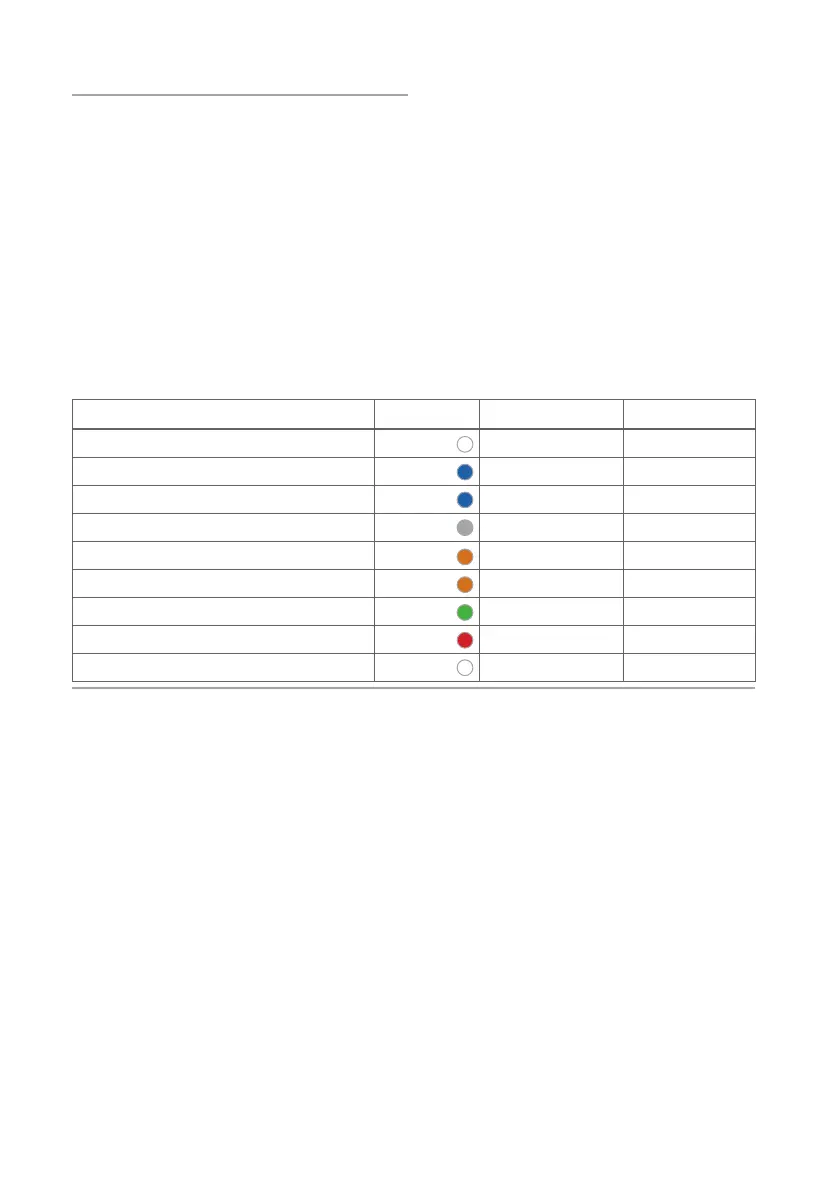
Meaning of LEDs on side of board
Meaning Colour Pattern Duration
Turn on* White Double Flash <1 second
Searching for Bluetooth connection Blue Flashing Continuous
Bluetooth connection successfully made Blue Continuous 3 seconds
Board is switched on O -
Battery is low warning Orange Blinking Continuous
Battery charging Orange Continuous Continuous
Battery full Green Continuous Continuous
Battery level critically low Red Flashing Continuous
Board shutting down**# White Triple slow ash 3 seconds
Table 1. LED meaning.
* Squares’ LEDs make a start-up pattern when turning on the board.
# Squares’ LEDs make inverse of start-up pattern when turning o the board
** Board can be turned o in 3 ways:
1. Turn o in app
2. Switch o with button 3 second hold
3. Switch o after 30 minutes of inactivity
How to move chess pieces
You can move the pieces just as you would on a normal chessboard. You do not have to press the
squares.
What happens if you move pieces too slowly
If a piece has been moved too slowly (e.g. sliding a rook slowly across the board), it is possible that a
move has been detected on a square between the origin and destination. Since the move was sent to
the platform, it cannot be corrected afterwards. If this problem occurs frequently, we recommend one of
the following solutions:
● Moving the pieces to the destination square faster.
● Lifting the pieces for each move.


 To Next Page