1
0
0
-
2
4
0
V
~
5
0
/
6
0
H
z
INRF
L
O
O
P
R
F
T
H
R
O
U
G
H
C
O
M
P
O
N
E
N
T
V
I
D
E
O
/
A
U
D
I
O
O
U
T
C
b
C
r
Y
R
C
O
A
X
IA
L
L
V
I
D
E
O
O
U
T
VIDEO
S
-
V
ID
E
O
U
p
g
r
a
d
e
USB
1
.
F
ro
n
t
p
a
n
e
l
1
S
T
A
N
D
B
Y
U
se
d
to
s
w
itc
h
th
e
s
et
t
op
b
ox
t
o
o
n
o
r
st
an
db
y
.
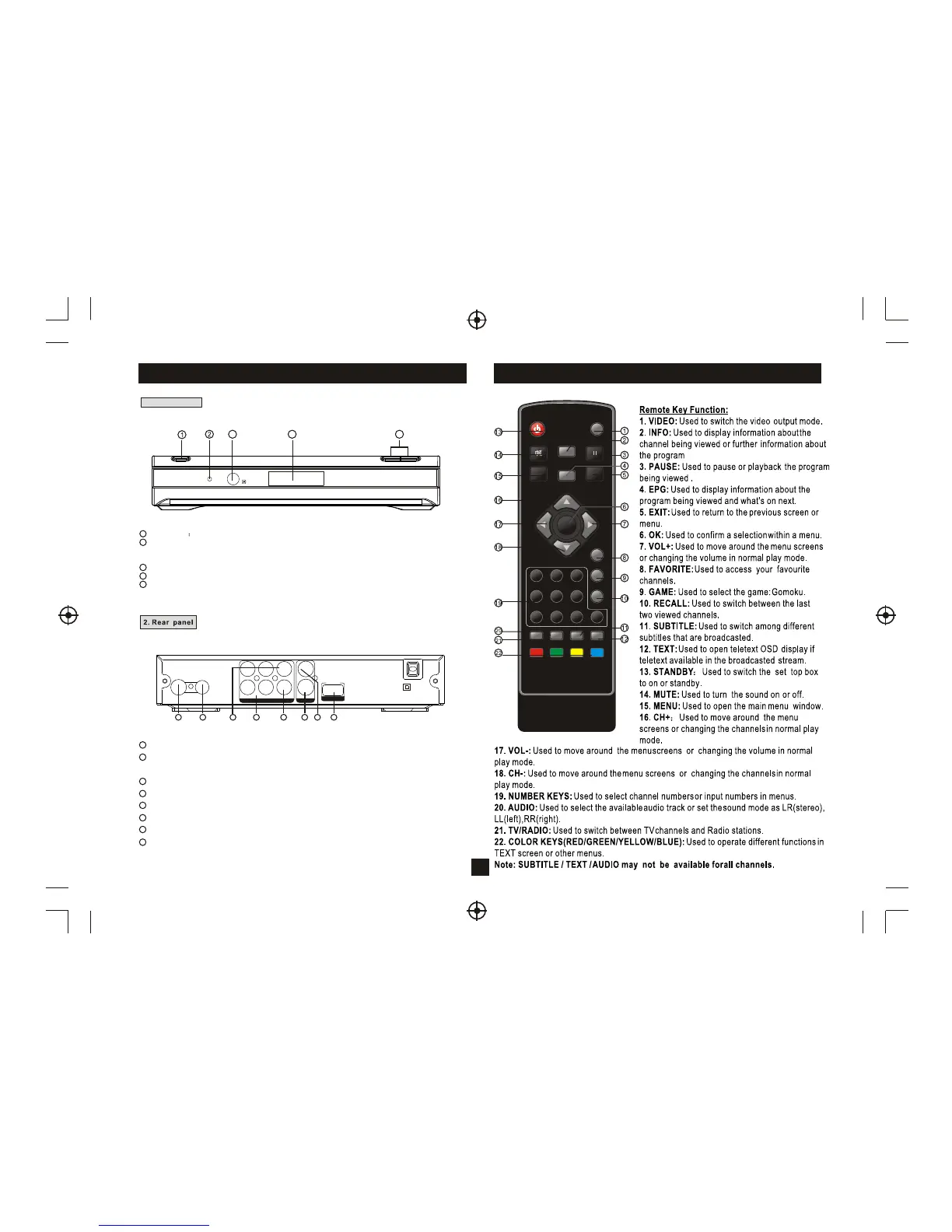
2 Standby Indicator: Used to visually show power state of the set top box, the green
LE
D
w
ill
s
ho
w
if
tu
rn
ed
o
n
th
e
s
et
to
p
b
ox
a
nd
th
e
re
d
L
E
D
w
ill
b
e
li
gh
t
if
t
he
s
et
t
op
b
ox
en
te
re
d
s
ta
nd
by
m
od
e.
3 REMOTE CONTROL SENSOR: Used to receive the signal from the remote control.
4
C
H
A
N
N
E
L
U
P
/D
O
W
N
:
U
se
d
to
c
ha
ng
e
c
ha
nn
el
s
w
ith
ou
t
us
in
g
th
e
re
m
ot
e
c
on
tr
ol
.
LE
D
D
IS
P
LA
Y
:
U
se
d
to
d
is
pl
ay
th
e
ti
m
e
o
r
ch
an
ne
l
in
fo
rm
at
io
n
5
3 5
1 2
3
4
5
6
7
8
1
2
3 COMPONENT VIDEO OUT:
4
5
6
7
RF IN : This socket connects to your external aerial.
RF LOOP THROUGH: This socket will bypass the RF signal to either your TV or another
video system.
These sockets connect to your TV component input terminals.
COAXIAL: This socket connects to a coaxial socket on your surround sound system.
USB: This socket is used to upgrade the software.
AUDIO L/R: This socket outputs analog audio L/R signal.
S-Video output: This socket outputs separate Y/C video signal.
VIDEO: This socket outputs composite video signal.
8
1
4
OK
EXIT
PAUSE
1 2 3
4 5 6
7 8 9 0
INFO
AUDIO
EPG
VOL
+
VOL
-
CH+
CH-
MENU
MUTE
RECALL
TV/RADIO
STANDBY
GAME
SUBTITLE TEXT
FAVORITE
VIDEO
Remote Controller
Front and Rear Panel Illustration



 To Next Page