EasyManua.ls Logo

Diamond Multimedia WR300NSI - User Manual

Diamond Multimedia WR300NSI
31 pages
Print Icon
To Next Page IconTo Next Page
Loading...
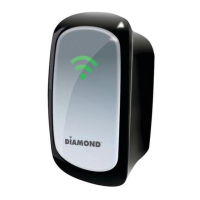
WR300NSI
Portable Wireless-N Repeater

Other manuals for Diamond Multimedia WR300NSI

Question and Answer IconNeed help?

Do you have a question about the Diamond Multimedia WR300NSI and is the answer not in the manual?

Summary

About the Device

Repeat and Extend WiFi

Explains the device's function to repeat and extend wireless signals.

Device Overview

Accessing the User Interface

Quick Connect Function

Instructions for initiating a scan for available wireless networks.

Setup Procedures

Mode of Operation Selection

Configuration options for Repeater, Access Point, or Bridge modes.

Wireless Configuration

Wireless Security Settings

Details on configuring WPA/WPA2 encryption and WPS.

System Management

Firmware Update Process

Procedure for updating the device's firmware.

System Password Protection

Setting a password to secure access to the web interface.

Configuring the Device

Wireless Repeater Setup

Wireless Access Point Setup

Wireless Bridge Setup

WPS Setup

Configure WR300 NSI via WPS

Steps to connect the device to a wireless router using WPS.

Safety Precautions

Technical Support

FCC Compliance

Summary

About the Device

Repeat and Extend WiFi

Explains the device's function to repeat and extend wireless signals.

Device Overview

Accessing the User Interface

Quick Connect Function

Instructions for initiating a scan for available wireless networks.

Setup Procedures

Mode of Operation Selection

Configuration options for Repeater, Access Point, or Bridge modes.

Wireless Configuration

Wireless Security Settings

Details on configuring WPA/WPA2 encryption and WPS.

System Management

Firmware Update Process

Procedure for updating the device's firmware.

System Password Protection

Setting a password to secure access to the web interface.

Configuring the Device

Wireless Repeater Setup

Wireless Access Point Setup

Wireless Bridge Setup

WPS Setup

Configure WR300 NSI via WPS

Steps to connect the device to a wireless router using WPS.

Safety Precautions

Technical Support

FCC Compliance

Diamond Multimedia WR300NSI Specifications

General IconGeneral
Frequency Band2.4 GHz
Maximum Wireless Speed300 Mbps
Antenna Gain5 dBi
SecurityWEP, WPA, WPA2
Wireless Standard802.11n
Ports1 x 10/100M Ethernet Port
Antenna2 x External
Operating Temperature0°C to 40°C (32°F to 104°F)
Humidity10% to 90% (non-condensing)
Storage Temperature-20°C to 70°C

Related product manuals