Cleaning
• Keep the level dry and clean. Remove
any moisture or dirt with a soft, dry cloth.
• Do not use harsh chemicals, strong
detergents or cleaning solvents to clean
the level.
• Do not submerge device in water while
cleaning .Wiping or cleaning on device
surface is sufficient
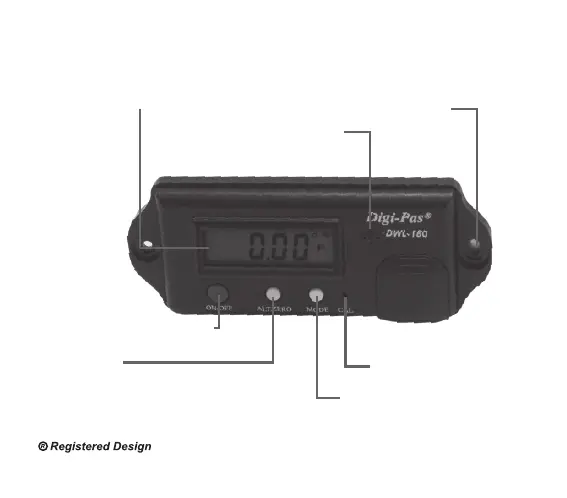
Device Overview :
LCD Display
ON/OFF: Power on/o device
Alt.Zero :
-
Set any angle to 0° as reference
- Press & Hold to turn on/o buzzer sound
MODE SELECT :
- Press to change display unit
:
°(Degree), %slope, mm/M, In/Ft
- Press & Hold to freeze Display value
CAL: Activate Calibration Mode
Sound Buzzer
Opening for screw



 To Next Page