EasyManua.ls Logo

Digi-Pas DWL3000XY - User Manual

Digi-Pas DWL3000XY
21 pages
Print Icon
To Next Page IconTo Next Page
Loading...
www.digipas.com version 1.11
Note: Contents in this instruction manual are continuously updated, please check Digi-Pas website for the latest version.
Digi-Pas
®
Installation and Operation Guidelines for
DWL3000XY and DWL3500XY
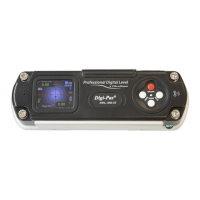
2-Axis High Precision Digital Machinist Level

Other manuals for Digi-Pas DWL3000XY

Question and Answer IconNeed help?

Do you have a question about the Digi-Pas DWL3000XY and is the answer not in the manual?

Summary

DEVICE OVERVIEW

Technical Specification

Details the technical specifications for DWL3000XY and DWL3500XY models, including range, accuracy, power, and materials.

Single Axis Mode

Illustrates the LCD display for single axis measurements, showing readings and indicators.

OPERATION PROCEDURE

Initialization

Guides on how to power up the device, insert batteries, or connect to a USB power source for initial use.

Absolute Level Mode

Details the procedure for using the Absolute Level mode to measure angles relative to gravity.

Alternate Zero Mode

Describes how to set a reference angle (0.00°) on a common plane for relative angle measurements.

STORAGE AND CLEANING

APPENDIX: USER CALIBRATION

Calibration Procedure

Step-by-step instructions on how to calibrate the Digi-Pas digital level using specific instruments.

Overview

The Digi-Pas DWL3000XY and DWL3500XY are 2-axis high-precision digital machinist levels designed for accurate angle and vibration measurements. These devices offer a range of features to enhance productivity and precision in various applications, from machine installation to quality alignment work.

Function Description

The primary function of the Digi-Pas DWL3000XY and DWL3500XY is to measure angles and vibrations with high precision. They operate in both single-axis and dual-axis modes, automatically detecting their orientation to provide appropriate readings. The devices are equipped with a color TFT LCD graphic digital display that shows real-time measurements.

In Absolute Level Mode, the device allows users to ensure each measurement reading adheres to the maximum specified device accuracy. This mode is crucial for establishing a true horizontal or vertical reference. The calibration process for this mode involves placing the device in two different positions (front and reverse 180 degrees) to ensure accurate leveling.

The Alternate Zero Mode enables users to measure relative angles at a common plane with respect to a user-defined reference angle. Any angle can be set as 0.00° for relative measurements, which is particularly useful when working with surfaces that are not perfectly level but require consistent relative angles. In single-axis mode, a reference line is displayed to indicate the angle, while in dual-axis mode, a reference crosshair shows the real angle.

The Angle Meter Mode provides real-time continuous angle measurements displayed in a line graph. This feature is valuable for monitoring dynamic changes in angle over time. Users can "freeze" the screen by pressing the HOLD button to pause the display and resume operation by pressing it again. This allows for detailed analysis of specific angle readings.

For vibration analysis, the Vibro Meter Mode offers real-time continuous vibration measurements, also displayed in a line graph. This mode is particularly useful for identifying and analyzing vibrations in machinery or structures. The device can detect and display the relative magnitude (g) of vibrations. Users can adjust the scale and speed of the line graph to suit their specific measurement needs. This feature is only applicable to Bluetooth-enabled devices.

The devices also include a SYNC Menu Mode that allows users to select connectivity options with a computer. Depending on the device version, it supports USB or Bluetooth connectivity for use with PC Sync Software. This enables remote monitoring, data logging, and further analysis of measurements on a computer. For Bluetooth devices, this feature facilitates wireless communication with smartphones or tablets running the Digi-Pas Mobile App.

Usage Features

The Digi-Pas levels are designed for ease of use with several practical features:

  • Intuitive Interface: The devices feature a clear LCD color graphic digital display that presents measurement data in an easily understandable format. The main menu is icon-driven, providing quick access to different measurement modes and settings.
  • Button Configuration: The device includes dedicated buttons for common functions: an ON/OFF button for power, a MODE button for switching between modes and confirming settings, and a HOLD/Right Scroll button for freezing readings or navigating menus.
  • Mounting Capability: Threaded holes are provided for mounting the device onto user-defined fixtures or machinery. This allows for stable and repeatable measurements, especially in industrial or workshop environments. The base screw holes are designed for mounting dome screws to achieve 3-point contact base leveling, while side screw holes offer additional mounting flexibility.
  • Power Options: The devices can be powered by four AAA 1.5V batteries or an external USB power source. This dual power option ensures continuous operation, whether in the field or connected to a power supply.
  • Sound Alert: A buzzer sound alert provides audible feedback, which can be configured in the settings menu.
  • Auto-Off and Auto-Dim: To conserve battery life, the devices feature adjustable auto-off and auto-dim settings, allowing users to customize the power-saving behavior.
  • Measurement Units: Users can change the measuring unit (Degree, mm/M, In/FT) through the setting menu to match their preferred system of measurement.
  • Display Brightness: The LCD display brightness is adjustable, ensuring readability in various lighting conditions.
  • Mobile App Connectivity (Optional): For Bluetooth-enabled versions, the Digi-Pas Mobile App (available in FREE and PAID versions) extends the device's functionality to smartphones and tablets. This app allows for remote 2-axis simultaneous leveling, angle measurement, and 2D concurrent alignment activities, significantly improving efficiency and enabling "one-man-operation."

Maintenance Features

Proper maintenance ensures the longevity and accuracy of the Digi-Pas digital levels:

  • Storage: When not in use, the device should be stored in its equipment box within a temperature range of -20°C to 60°C (-4°F to 140°F). It is crucial to remove the batteries when the device is not in use for extended periods to prevent leakage and damage.
  • Cleaning: The device should be kept dry and clean. Any moisture or dirt on the contact surfaces should be removed with a soft, dry cloth before measurement to maintain maximum accuracy. Harsh chemicals, strong detergents, or cleaning solvents should not be used, and the device should never be submerged in liquid during cleaning.
  • Calibration: For maximum accuracy, users are advised to perform calibration (User Self Calibration) or utilize the Absolute Level mode before taking measurements. Calibration tutorial videos are available on the Digi-Pas website, providing step-by-step guidance. During calibration, it is important to allow sufficient warm-up time and to hold the device firmly without movement.
  • Battery Polarity: When inserting batteries, users must observe the correct polarity direction as indicated on the battery compartment to ensure the device functions properly.
  • USB Power Source Quality: If using a USB power source, it is important to note that poorly regulated power sources might affect device performance.

Digi-Pas DWL3000XY Specifications

General IconGeneral
Self-Leveling Range±3°
Operating TimeUp to 20 hours
Protection RatingIP54
DisplayLCD
Working Range0.05 m to 3000 m
Operating Temperature-10°C to +50°C
Leveling Time3 seconds
Laser Diode635nm, Class II

Related product manuals