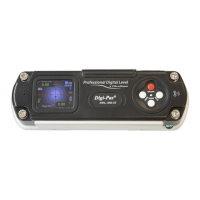
The Digi-Pas DWL2000XY is a 2-axis precision digital level designed for accurate measurement of angles and inclinations. It is manufactured under ISO9001 and ISO14001 standards and is certified by UKAS, SGS, CE, FCC, and RoHS.
Function Description:
The DWL2000XY functions as a highly accurate digital level, capable of measuring angles in both single-axis and dual-axis modes. It provides digital readings on a color TFT LCD, allowing users to precisely determine the inclination of a surface. The device incorporates features like Absolute Level setting for maximum accuracy, Alternate Zero for measuring relative angles, and a Setting Menu for customizing various parameters. It also includes a buzzer for sound alerts and a HOLD function to freeze display values. The dual-axis mode displays both horizontal (X) and vertical (Y) axis readings, with a "Target Ball" or "Bull Eye" graphic that blinks when the measurement stabilizes, mimicking traditional bubble vials.
Important Technical Specifications:
- Measurement Range (Single Axis Mode): 0.00° to ± 90.00°
- Measurement Range (2-Axis Mode): 0.00° to ± 3.00°
- Resolution: 0.01° (175µm/M) (0.002 in/ft)
- Accuracy:
- ± 0.02° at 0.00° ~ ± 2.00° (349µm/M) (0.004 in/ft) (72 Arcsec)
- ± 0.04° at other angles
- Repeatability: 0.01° (175µm/M) (0.002 in/ft)
- Cross Axis Error: Negligible (± 0.0025°)
- Display: Colour TFT LCD
- Power Supply: 4 x AAA 1.5V Batteries / USB (external USB power source can be used)
- Material: PC ABS / Aluminium
- Connectivity: USB 2.0 Cable (≤ 5 metre)
- PC SYNC Software: Professional Edition (Optional)
- Operating Temperature: -10°C to +50°C (Calibrated) / 14°F to 122°F (Calibrated)
- Dimension (mm): 188 x 62 x 37
- Nett Weight (Approx.): 580 gram
- User Self Calibration: Yes
Usage Features:
- Operating Procedure:
- Insert 4 AAA batteries or connect a USB power source.
- Press the ON/OFF button.
- Allow sufficient warm-up time for stabilization.
- For maximum accuracy, perform user calibration or Absolute Level setting before measurement.
- Mounting: Two threaded holes (M5) are provided for mounting the device onto user-defined fixtures or machinery. Users should replace the set screws with appropriate screws.
- Single Axis Mode Interface: Displays digital readings, battery level, measurement units, and a sound alert indicator. An arrow sign indicates the higher side of the surface.
- Dual Axis Mode Interface: Displays horizontal (X) and vertical (Y) axis digital readings, battery level, measurement units, and a micrometer graphic. A "Target Ball" or "Bull Eye" moves towards the measured position, and green arrows indicate the higher side of the plane. The "Target Ball" blinks when measurement stabilizes.
- HOLD Function: Freezes the display value. Pressing the HOLD button again resumes operation.
- UNIT Button: Changes the measurement unit between degrees (°), mm/M, and In/FT.
- MODE Button: Changes the function and display mode, and is used for selection.
- CAL Button: Activates calibration mode.
- ON/OFF Button: Powers the device on/off and escapes from mode functions.
- Main Menu: Accessible via the central button, it provides access to:
- Absolute Level Setting: Ensures measurement readings are in accordance with maximum device accuracy. Requires placing the device in two positions (front and reverse 180°) and pressing MODE to start measurement in each position.
- Alternate Zero Setting: Allows users to measure relative angles by setting any angle as a 0.00° reference. The device auto-detects single-axis or 2-axis position.
- Setting Menu: Configures device parameters.
- Help Menu: Provides a quick reference for button configurations.
- Setting Menu Parameters:
- AutoOff: Sets automatic power-off time.
- AutoDim: Sets automatic display dimming time.
- Units: Changes measuring units.
- Buzzers: Turns the device buzzer on/off.
- Display Brightness: Adjusts LCD brightness.
- User Calibration (Appendix): A detailed 8-step process using a granite table and master square to achieve maximum accuracy. This involves placing the device in various orientations (Position 1 to Position 8) and pressing the MODE button to initiate measurements and countdowns. It is crucial to hold the device firmly during calibration to prevent movement.
Maintenance Features:
- Storage: Keep the device in its equipment box within a temperature range of -20°C to 60°C (-4°F to 140°F). Remove batteries when the device is not in use.
- Cleaning: Keep the device dry and clean. Remove moisture or dirt with a soft dry cloth. Avoid harsh chemicals, strong detergents, or cleaning solvents. Do not submerge the device in liquid.
- Note on Contact Surfaces: Always ensure the contact surfaces of the device and the measuring plane are clean and free from dust particles for accurate measurements.

 Need help?
 General

 To Next Page