EasyManua.ls Logo

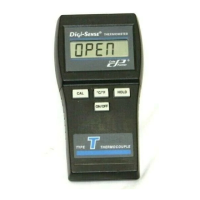
Digi-Sense J - User Manual

Digi-Sense J
26 pages
Print Icon
To Next Page IconTo Next Page
Loading...
Single-Input
Thermocouple
Thermometers
T
ype
J
, K,
T
68X001351 Rev0 0717 1065DGMAN_91428-00,-01,-02
Instruction Manual
Single-Input
Thermocouple
Thermometers
Type J, K, T
www.GlobalTestSupply.com
Find Quality Products Online at: sales@GlobalTestSupply.com

Questions and Answers

  • A
    Alexis CollinsAug 2, 2025
    Why does my Digi-Sense J display show dashes?
    • R
      Rhonda WilliamsAug 2, 2025
      The display showing '- - - -' on your Digi-Sense Thermometer indicates an out-of-range reading.

  • A
    Alexander RoseAug 16, 2025
    What to do if Digi-Sense Thermometer display shows Err?
    • W
      William JohnsonAug 16, 2025
      If your Digi-Sense Thermometer displays 'Err' (other than during field calibration), it needs servicing. Please return the instrument for repair.

Summary

Safety Precautions

Specifications

Battery Installation and Replacement

Self Test

Connecting a Thermocouple

Key Functions

Display Overview

Selecting Temperature Scale

Hold Function

Min and Max Function

Auto Off Function

Calibration

Canceling a Field Calibration

Field Calibration Lockout and Re-Enable

Batteries

Troubleshooting

Digi-Sense J Specifications

General IconGeneral
BrandDigi-Sense
ModelJ
CategoryThermometer
LanguageEnglish

Related product manuals