Need help?
Do you have a question about the digico SD10 and is the answer not in the manual?
Details the terms and conditions for the use of the SD10 software product and its licensing.
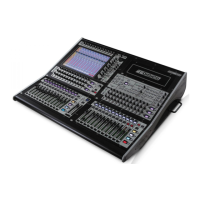
Overview of the Digico SD10 console, its onboard engine, inputs, outputs, and worksurface.
Explanation of the manual's chapters, structure, and typographical conventions used.
General operating principles and terms to understand before using the manual.
Detailed breakdown of the worksurface layout, including centre, left, and right sections.
How to assign worksurface sections to the touchscreen for control and viewing.
Explanation of how the worksurface is divided into layers and banks of channels.
Methods for accessing functions via touchscreen, encoders, switches, and faders.
How to assign a channel and access its detailed controls via pop-ups and encoders.
Default assignment and alternative uses of the master fader.
Explanation of the 2nd function and Option/All buttons in the centre section.
Description of the four main channel types: Input, Aux, Group, and Matrix.
Details on connecting and configuring the console's hardware and I/O.
Information on connecting the console to remote I/O racks via MADI or optical fibre.
Guide to the Audio I/O window for configuring physical I/O, sockets, and naming.
Setting up standard MADI connections and naming signals for routing.
Methods for routing audio between two connected DiGiCo consoles.
Configuring rack sharing and states (Isolate, Receive Only, Full Control) between consoles.
 General
| Console Type | Digital Mixing Console |
|---|---|
| Input Channels | 96 |
| Matrix | 16 x 12 |
| Output Busses | 48 |
| Touch Screens | 1 |
| Effects | Yes |
| Sample Rate | 96kHz |
| Connectivity | MADI |
| EQ | 4-band parametric EQ |
| Processing | FPGA-based |
| Power Supply | Redundant |

 To Next Page