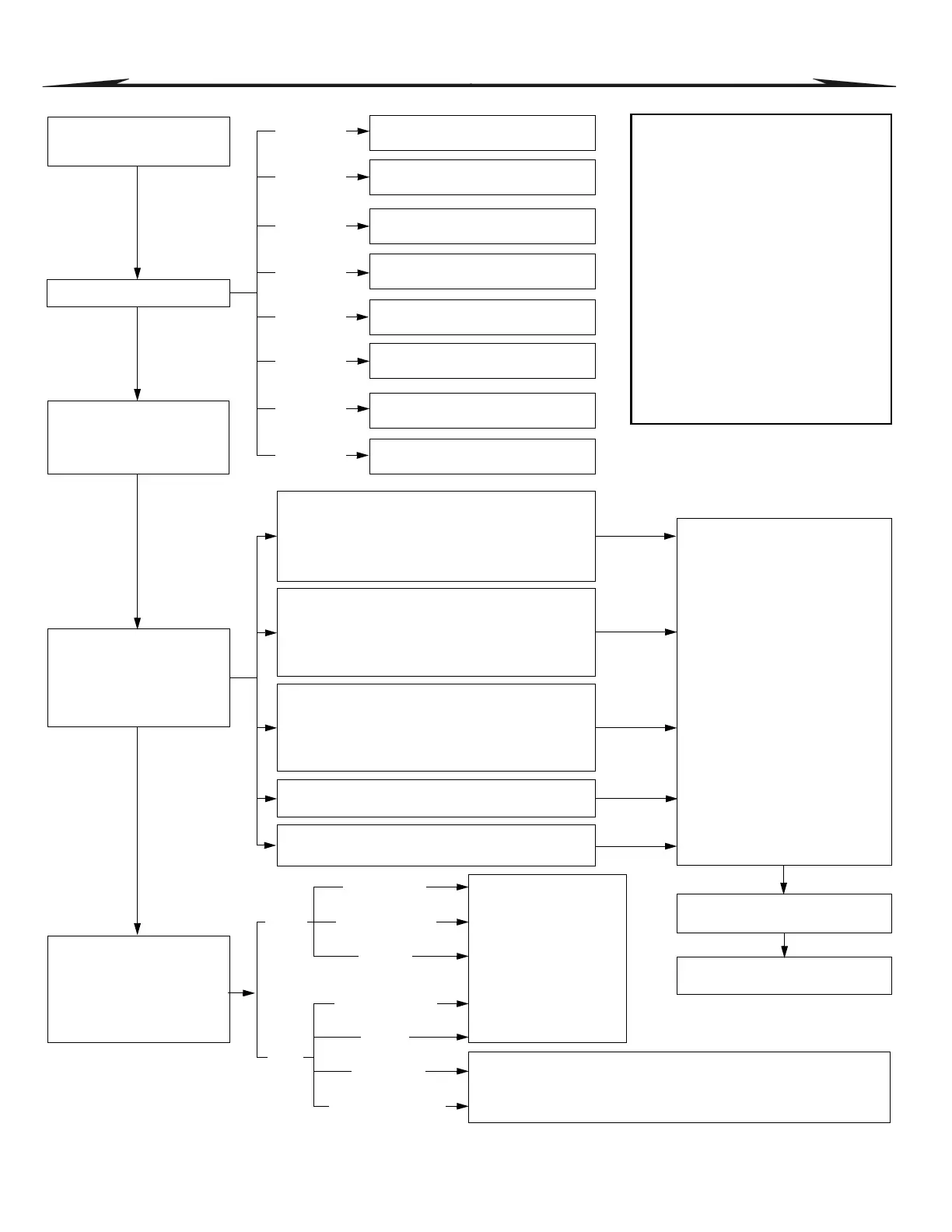
Dialing Enabled/Disabled
Section [3036]
Option [3]
Reporting Account Numbers
Monitoring Station
Telephone Numbers
1 to 4 (32 digits)
Sections [3071] to [3074]
Event Call Direction
Defines to which Monitoring
Station Telephone Number
each specific group of events
will be reported.
Reporting Formats
Section [3070]
First digit= MSTN #1
Second digit=MSTN #2
Third digit=MSTN #3
Fourth digit=MSTN #4
Partition 1
Partition 2
Partition 3
Partition 4
Partition 5
Partition 6
Partition 7
Partition 8
Reporting Account Number 1
3 or 4 digits (0-F) in Section [3061]
Reporting Account Number 2
3 or 4 digits (0-F) in Section [3062]
Reporting Account Number 3
3 or 4 digits (0-F) in Section [3063]
Reporting Account Number 4
3 or 4 digits (0-F) in Section [3064]
Reporting Account Number 5
3 or 4 digits (0-F) in Section [3065]
Reporting Account Number 6
3 or 4 digits (0-F) in Section [3066]
Reporting Account Number 7
3 or 4 digits (0-F) in Section [3067]
Reporting Account Number 8
3 or 4 digits (0-F) in Section [3068]
MSTN = Monitoring Station
Telephone Number
[0]
Ademco Slow
[1]
Silent Knight Fast
[2]
Sescoa
[3]
Ademco Express
[7]
Pager
[6]
SIA FSK
[5]
Ademco Contact I.D.
Pulse
DTMF
(Tone)
Program 2-digit (00-FF)
report codes into:
Sections [0201] to [0296]
Sections [0701] to [0732]
Sections [0801] to [0832]
Sections [2001] to [2099]
Sections [2101] to [2199]
Sections [3900] to [3991]
Sections [4030] to [4037]
Manual & Automatic programming of report codes, refer to:
1) Ademco Contact ID and SIA FSK under Reporting Formats on page 24
2) Auto Report Code Programming on page 26
Dialing sequences for Arm/Disarm Report Codes
Partition 1 = [3127] Partition 5 = [3527]
Partition 2 = [3227] Partition 6 = [3627]
Partition 3 = [3327] Partition 7 = [3727]
Partition 4 = [3427] Partition 8 = [3827]
Dialing sequences for Alarm/Restore Report Codes
Partition 1 = [3128] Partition 5 = [3528]
Partition 2 = [3228] Partition 6 = [3628]
Partition 3 = [3328] Partition 7 = [3728]
Partition 4 = [3428] Partition 8 = [3828]
Dialing sequences for Tamper/Restore Report Codes
Partition 1 = [3129] Partition 5 = [3529]
Partition 2 = [3229] Partition 6 = [3629]
Partition 3 = [3329] Partition 7 = [3729]
Partition 4 = [3429] Partition 8 = [3829]
Dialing sequence for
Trouble/Restore Report Codes: [3080]
Dialing sequence for
System Special Report Codes: [3081]
[1] = Call Monitoring Telephone 1
[2] = Call Monitoring Telephone 2
[3] = Call Monitoring Telephone 3
[4] = Call Monitoring Telephone 4
[5] = Backup on Telephone 1
[6] = Backup on Telephone 6
[7] = Backu
p on Telephone 7
[8] = Backup on Telephone 8
For each section (dialing sequence)
enable up to 4 monitoring station
telephone numbers and 1 backup
telephone number. The numbers are
dialed sequentially from 1 to 4
followed by the backup number.
This sequence will continue until
each number has been dialed at
least once.
Related Features
Delay Before Alarm Transmission: [3055]
Pager Format Delay Transmission: [3057]
Recent Closing Delay
Sections [3109], [3209], [3309], [3409],
[3509], [3609], [3709] and [3809]
Power Failure Report Delay: [3058]
Auto Test Report: [3040] and [3041]
Report Disarm Options
Option [7]: Sections [3123], [3223], [3323],
[3423], [3523], [3623], [3723] and [3823]
Report Zone Restore Options
Section [3037] Option [8]
Alternate Dial
Section [3037] Option [6]
Maximum Dialing Attempt
Section [3056]
Delay Between Dialing Attempts
Section [3054]



 To Next Page