Need help?
Do you have a question about the DigiPower RF-6H50 and is the answer not in the manual?
Instruction to open the camera's USB door.
Guidance on how to detach the camera's USB door.
Advice to keep the removed USB door secure for later reinstallation.
Step to open the security clip on the ActionPack housing.
Action to prepare the housing by moving the clip and frame.
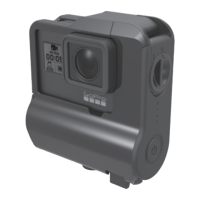
Step to firmly connect the GoPro camera to the ActionPack's charging port.
Instruction to latch the case securely for waterproofing.
Guide to finding and unlocking the micro USB charging port.
Instruction to insert the USB cable into the port.
Recommendation for 2 Amp supply and how camera/ActionPack batteries charge.
Critical instruction to ensure waterproofing by locking the USB door.
How to turn the ActionPack device on and off using the power button.
Explanation of LED patterns indicating battery charge level.
Details on how charging occurs when using a 1 amp charger.
Guide to understanding LED indicators for battery charge.
Estimated charging times for camera and ActionPack with a 1 Amp supply.
Estimated charging times for camera and ActionPack with a 2 Amp supply.
Table showing battery life based on camera resolution and Wi-Fi status.
Instructions for sliding the mounting plate onto the ActionPack body.
Steps to remove the mounting plate by pushing inward on tabs.
Explanation of ActionPack LEDs and how it powers the camera.
How the camera's battery display behaves when charging from the ActionPack.
Notes on turning the ActionPack on/off and camera interaction.
Details on the ActionPack's IP68 rating and testing procedures.
How to connect ActionPack to a power source for continuous recording.
Precautionary steps for inspecting and drying the camera before case removal.
Procedure for holding the camera and unlatching the ActionPack casing.
Final steps for removing the camera and checking the USB-C port for moisture.
Guidance on checking for dust/dirt affecting the waterproof seal before use.
Instructions for cleaning ports after using the ActionPack in salt water.
Critical warning about damaging the ActionPack if immersed without the camera.
Details on battery capacity, input, and output voltage/current.
Information regarding the ActionPack's weight and physical measurements.
Information on how to reach technical support via email.
Details on the one-year warranty, exclusions, and conditions.
Instructions for making a warranty claim and understanding legal rights.
 General
| Operating Distance | Up to 100m (328 ft) |
|---|---|
| Channels | 16 |
| Type | Wireless |
| Power Source (Transmitter) | 2 x AAA batteries |
| Battery Type | AAA |
| Voltage | 1.5V |

 To Next Page