12 Plasma TV
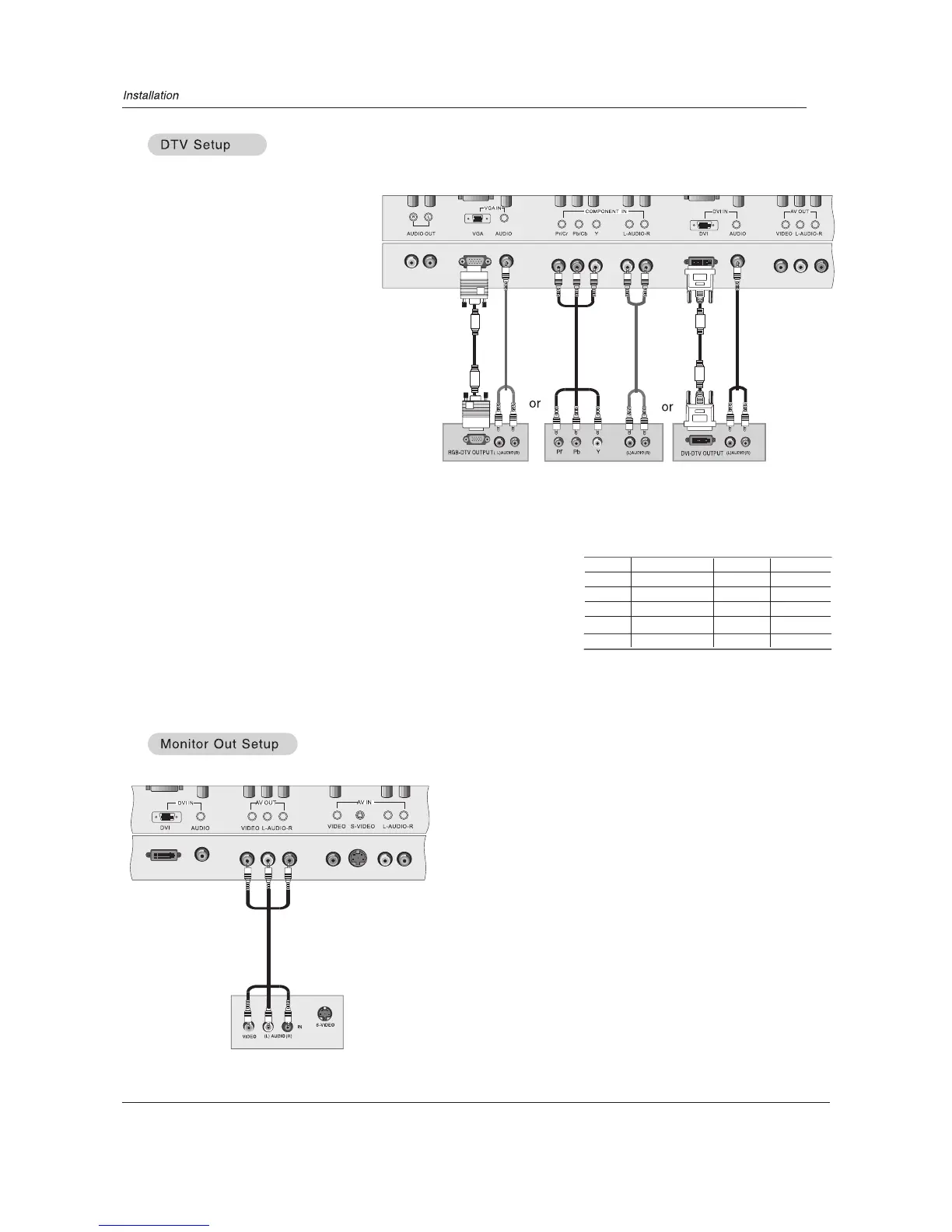
- To watch digitally broadcast programs, purchase and connect a digital set-top box.
Digital Set-top Box
How to connect
Use the COMPONENT (Y, Pb, Pr)IN jacks, VGA or DVI IN port for
video connections, depending on your set-top box connections available.
Then, make the corresponding audio connections.
How to use
1. Turn on the digital set-top box. (Refer to the owner`s manual for the digital
set-top box.)
2. Use INPUT on the remote control to select YPbPr/YCbCr, VGA, or DVI source.
TV`s
Signal
480i
480p
720p
1080i
1080p
YPbPr/YCbCr
Yes
Yes
Yes
Yes
Yes
VGA
Yes
Yes
Yes
Yes
No
DVI
No
Yes
Yes
Yes
No
The has a special signal output capability which allows
you to hook up a second TV or TV.
Connect the second TV or TV to the `s AV OUT.
See the Operating Manual of the second or TV for further
details regarding that device`s input settings.
NOTE
YPbPr/YCbCr, VGA, DVI input sources cannot be used for monitor out.
TV
TV
TV



 To Next Page