Digital Acoustics IP7-FX
Installation and SIP Configuration
Page 3 of 4
SIP Configuration
If the eSIP Configuration utility has already been installed and the defaults have been setup, skip to the Select the
General Settings tab step.
Download and install the eSIP Configuration utility from https://www.digitalacoustics.com/support/software-firmware-
downloads/
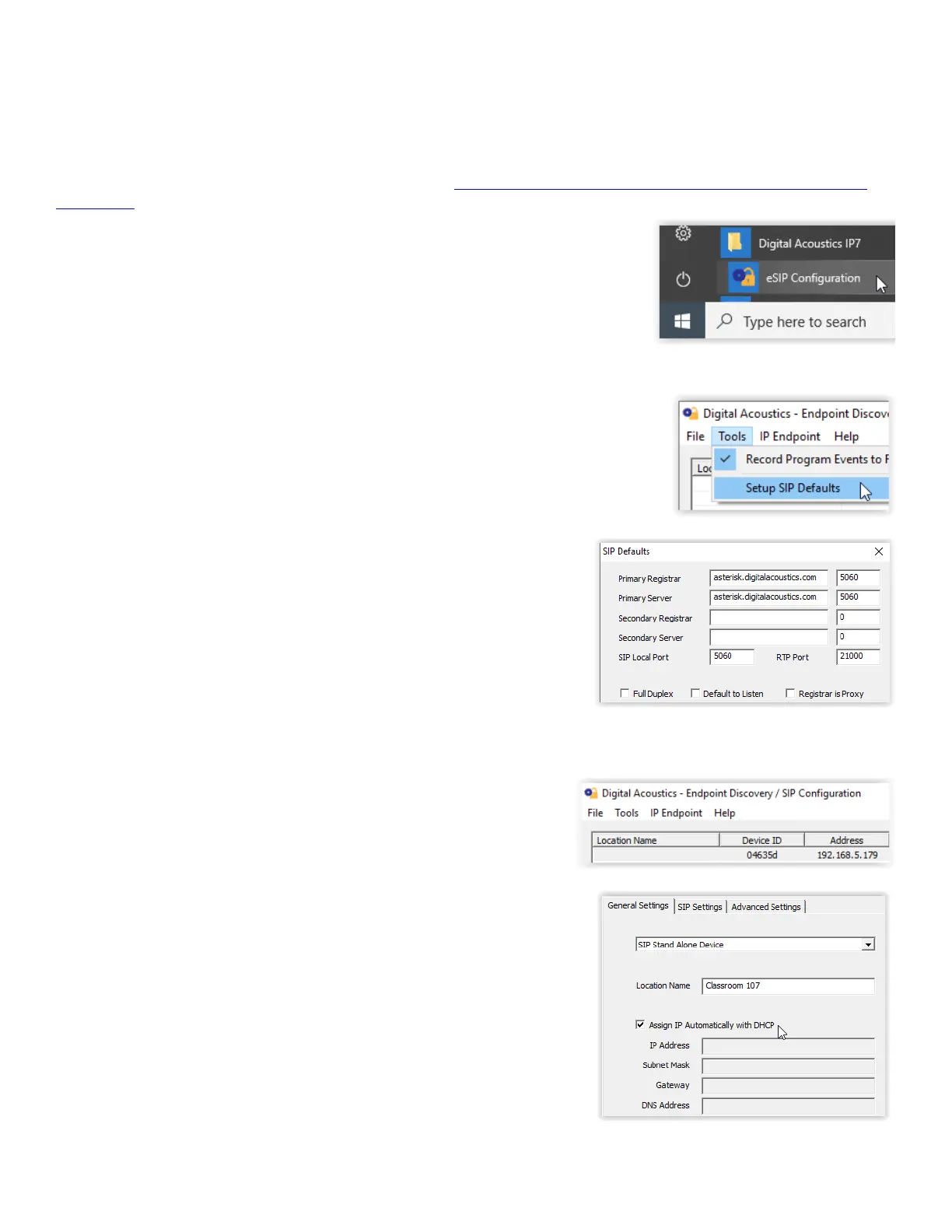
• After the configuration utility has been installed, open it from the Windows® Start
menu by selecting Digital Acoustics IP7 → eSIP Configuration
• Click menu option Tools → Setup SIP Defaults to setup the default SIP based
Phone system
• In the Primary Registrar (also know as the Domain), enter the IP
Address or DNS and the port of the SIP based phone system
• The Primary Server (also known as the Proxy Address) is typically the
same as the Primary Registrar. If this is different than the Primary
Registrar, then the Registrar is Proxy box must be checked
• The Secondary Registrar and Secondary Server are only specified if a
backup VOIP based phone system is available in case the Primary fails
• The SIP Local Port and RTP Port specify the ports used by the IP7
when communicating with the VOIP based Phone system
• Press the OK button to save the defaults
Select the General Settings tab
• Press the Find Devices button to discover any new IP7 devices that
are connected to the network. The IP7 devices will be listed on the left
hand side of the screen
• Click on an IP7 Endpoint to be configured (match the Device ID
column to the Intercom’s previously recorded ID#)
• On the right hand side of the screen, select SIP Standalone Device from
the dropdown
• Enter a descriptive name into the Location Name field (this name is only
used by this utility. The description from the phone system will be used to
identify this endpoint during a call)
• Check the DHCP option to automatcally assign the IP Address infromation
or uncheck it to enter static IP address information


 To Next Page
 Loading...


