104 Digital Alert Systems: DASDEC User Manual
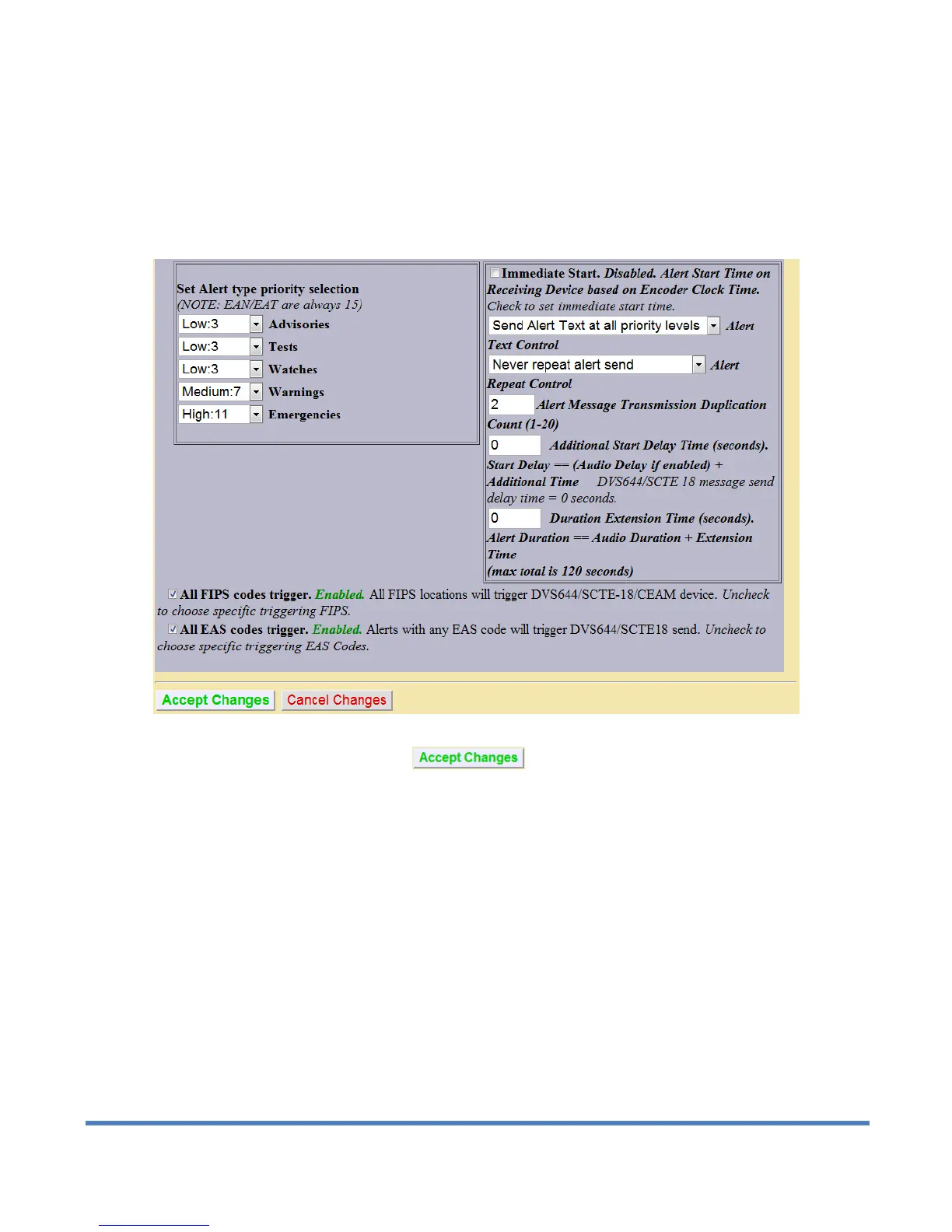
All EAS codes trigger
If enabled, all EAS codes will trigger the DVS644/SCTE18 client interface. In the next screen shot this option is
enabled. Set the checkbox to enable/disable EAS code filtered trigger control. If disabled, then the alert EAS
code is filtered for a specific match as a way to control whether or not DVS644/SCTE18 is triggered. If All EAS is
disabled, select EAS codes from the provided lists and add to the client EAS list. If the EAS codes of an active
forwarded/originated alert matches any of these EAS, the alert will be sent using the DVS-644/SCTE18 client.
With careful use of this feature, and with multiple clients, one DASDEC II can serve many different cable regions
at the same time.
DVS-644/SCTE18 Client Configuration Interface, bottom half of table
When you finish making changes, click to save the configuration.
4.10.5 Stream MPEG
If Streaming MPEG hardware/software is available on the One-NetSE, a tabbed page will display under Setup >
Net Alerts that allows configuration of up to two client targets. As in the other Net Alert pages, use the Alert
Forwarding and/or the Encoder Alert Stream toggles to enable/disable the use of streaming MPEG clients when
alerts are forwarded and/or originated.


 To Next Page