EasyManua.ls Logo

Digital Barriers EdgeVis HD-IP200 Hardware Installation Guide

Default Icon
12 pages
To Next Page IconTo Next Page
Page #1 background imageLoading...
Page #1 background image
© Copyright 2020 Digital Barriers plc
EDGEVIS HD-IP200
HARDWARE INSTALLATION GUIDE
VERSION 8.0 MARCH 22
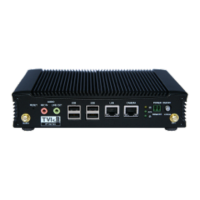
Thank you for purchasing the EdgeVis HD-IP200. This document explains how to physically configure the HD-IP200.
As well as identifying the available connectors and status indicators on the device, it also details how to add your
desired SIM card to it. This document should be read in conjunction with the IP Series, HD-Q800, 4K-R800 - Setup
Guide, which covers the web-based setup interface for all devices in the IP Series range, including the HD-IP200.

Other manuals for Digital Barriers EdgeVis HD-IP200

Question and Answer IconNeed help?

Do you have a question about the Digital Barriers EdgeVis HD-IP200 and is the answer not in the manual?

Digital Barriers EdgeVis HD-IP200 Specifications

General IconGeneral
Audio CompressionG.711
Video CompressionH.264
IP Interface10/100 Mbps Ethernet
Power12V DC
Frame RateUp to 30fps
Weight250g

Related product manuals