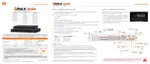
1. There is an e-SATA port on the rear panel of the DVR.
2. It is for applying additional HDD for recording only(not for backup).
3. It doesn’t support Hot Plug, so it order to be recognized normally, DVR
must be rebooted after connection.
4. If the external device supports RAID, it is required to check if it is
recognized as a normal HDD when the RAID is released.
4.1.5. Settings
Product Registration
The administrator can register contact information to expedite DW technical support for the
DW server.
Startup Wizard
Manually launch the DVR Startup Wizard.
Factory Default
Reset the system back to its factory default configuration. Once the factory default is done,
all the configurations will be deleted and the system setting will return to its original factory
default. The recorded video will not be deleted.
Export/Import
Copy the system configuration values from this DVR to save for your records or copy them
to another DVR.
• Export: Copy the settings of this system to a USB memory device.
• Import: apply settings from another DVR via a USB memory device.
During the Import process, make sure that the F/W version of the sourced DVR is
the same as the target DVR’s



 To Next Page
 Loading...