6
LCD DISPLAY SYSTEM SETTINGS
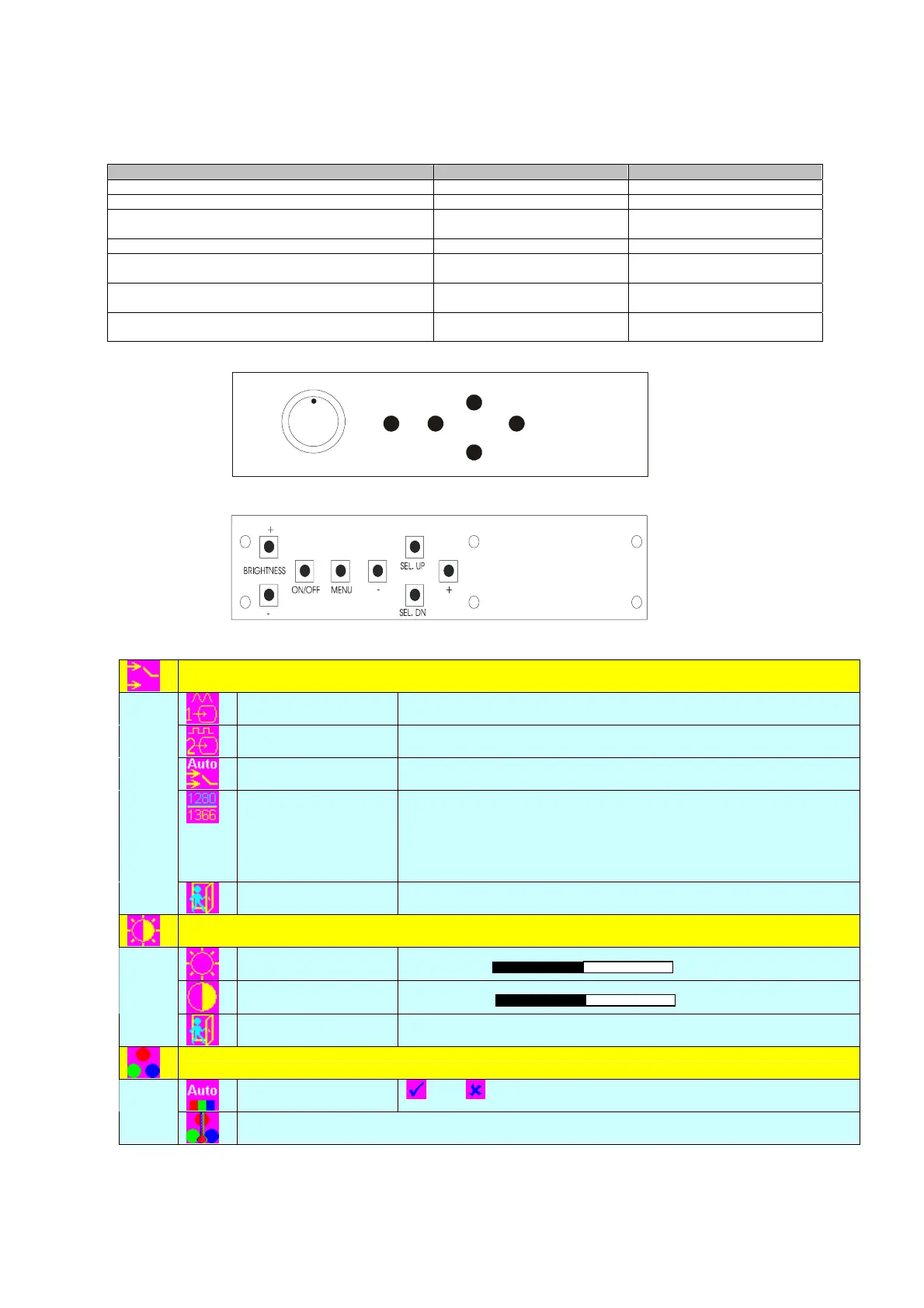
NOTE: By way of explanation the following refers to a set of sample buttons that may be obtained as an option. In addition
to power on/off and connection for backlight brightness the controller provides an On Screen Display of certain functions
which are controlled by 5 momentary type buttons (analog VR type) or 8 momentary type buttons (digital type):
Controls Analog VR type Digital type
On/Off – turns controller board power on VR toggle switch On/Off button
Brightness – controls backlight brightness Rotary VR Brightness +/- buttons
Menu – turns OSD menu On or Off (it will auto time
off)
Menu button Menu button
Select – Select function / Confirm SEL DN SEL DN
Move up to select individual RGB color level OSD
page
SEL UP SEL UP
+ – increase the setting / moves the selector to the
next function
+ +
- - decrease the setting / moves the selector to the
previous function
- -
OSD Functions
Select input source
Input source 1
Select input source to Analog RGB
Input source 2
Select input source to DVI
Auto Source Seek
ON – Auto source select always enable
OFF – Disable auto source select function
Wide screen mode
information display
Select the input mode (1280 / 1360 / 1366 / 1368) to recognize and display the
correct input signal information display on the OSD menu.
1280 : 1280x768
1360 : 1360x768
1366 :1366x768
1368 : 1368x768
Exit
Exit the OSD menu and save the settings
Brightness and Contrast
Brightness
Increase/decrease brightness level.
Press – or + (- + ) Total : 256 steps
Contrast
Increase/decrease panel contrast level.
Press – or + (- + ) Total : 192 steps
Exit
Exit the OSD menu and save the settings
Color
Auto RGB Calibration
Yes No
Color Temperature 4 (Adjust the warmness of the image displayed. The higher temperature the
coolest image looks like. The lower temperature the warmest image looks like.)
ON/Off/Brightness
SEL UP
SEL DN
+
-
Menu
Analog VR type
Digital type


 To Next Page
 Loading...