UHD Stream Generator
User’s Manual
01. Summary
12
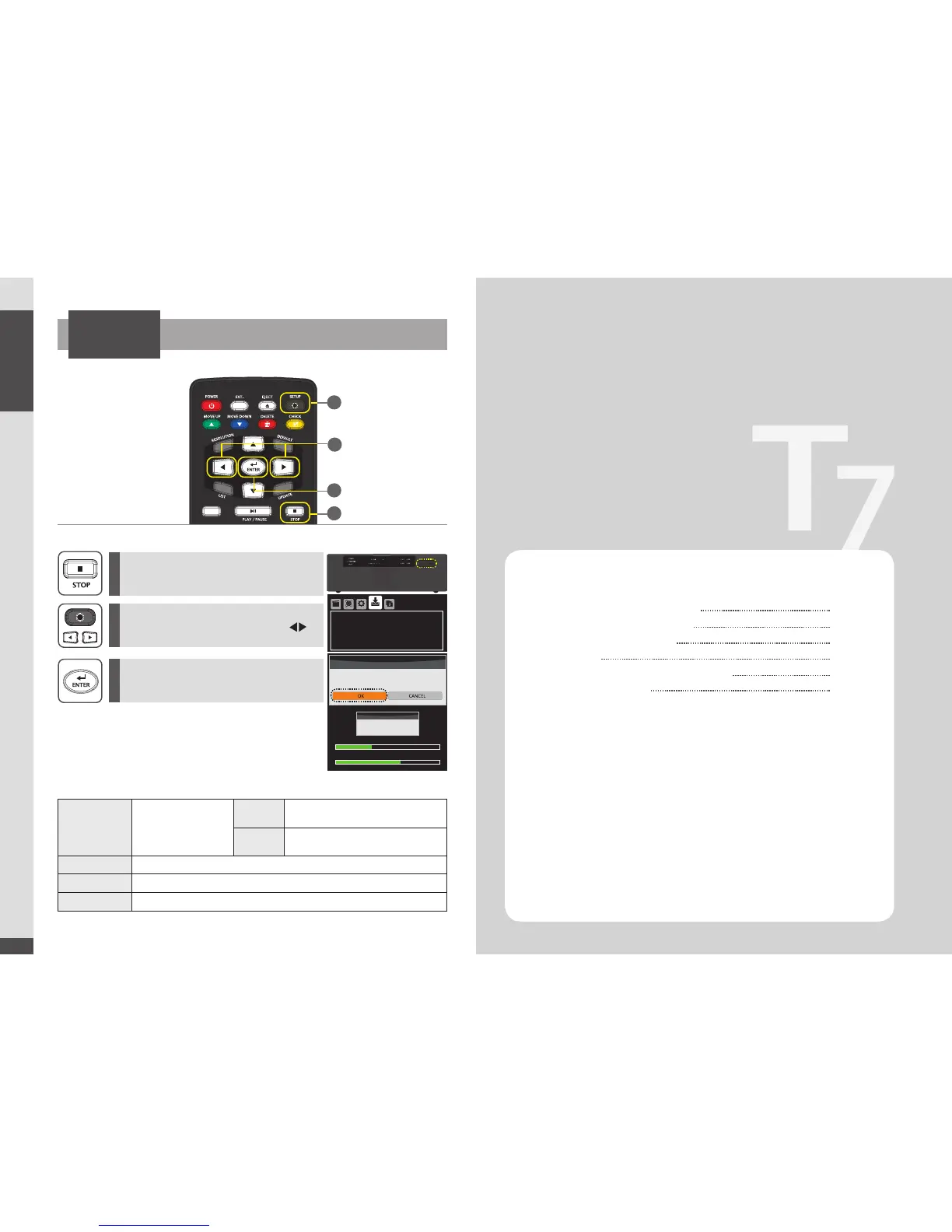
How to Update Firmware Manually
2
1
3
Press [SETUP] button to open settings menu
and
then move to
‘UPDATE’ menu using [ ]
direction button.
Press [STOP] to stop playing files and then
plug USB into UHD Stream Generator.
Move to ‘New Version’ and then press [ENTER].
Select ‘OK’ on CONFIRMATION Pop-up menu
and then Press [ENTER].
SETTINGS
New Version
It will be displayed new
rmware version in USB.
Update will be processed if
you press [ENTER] button on
new rmware
None There is no upgradable rmware le(s)
X.XX
(version NO.)
Possible to upgrade rmware
Software Version It is showing current Firmware version
System Version It is showing current System version
Model
Shows UHD Stream Generator model name
Getting Started
02
※ Automatic Firmware Update:
2
2
1
3
Firmware will be automatically updated if USB device is connected while it is
playing files. CONFIRMATION Pop-up menu will be appeared on the screen If
USB device contains a firmware file .
Select OK button to update the firmware.
(Firmware file has to be stored in the root folder of USB)
USB
CONFIRMATION
Current version : xxx
Would you like to update software to Vxxx?
UPDATE
WARNING
Please don’t turn off system
Total Est. Time : 0:00:16 Status : File Copying
Size : 190MB
File Name xxxx.xx
Current Est. Time : 00:00:13
35%
65%
Important Safety Instructions
Guide to Parts and Controls
How to Use Top Buttons
Remote
Package and Accessories / Cautions
Connecting Cable
14
15
16
17
18
19


 To Next Page