EasyManua.ls Logo

DigiTech AA2143 - User Manual

DigiTech AA2143
3 pages
Print Icon
To Next Page IconTo Next Page
Loading...
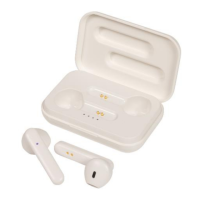
Wireless TWS Earphones
with Bluetooth 5.0 Technology
AA2143
User Manual
Specifications:
True wireless stereo (TWS), real no wires design, individual en and right channel, HIFI sound.
both the left and right earbud are Bluetooth enabled. could be used separately, or used as one
pair
Bluetooth version. V5.0+EDR(both sides), ultra low consumption
Bluetooth Mode: A2DP1. 3/HFP1. 6/HSP 1 2/AVRCP1.6/D11.3
Bluetooth Frequency: 2. 4GHZ
Bluetooth Range: 10-15meters with no obstacles
Battery capacity. Earbud: 30 mah rechargeable Li-ion battery
charging dock: 300mah (optional)
Talk/Play time Single earbud mode: 3-4 hours
One Pair earbuds mode: 2 hours
Standby time:
Single earbud mode: 100 hours
One pair earbuds mode: 60 hours
Question and Answer IconNeed help?

Do you have a question about the DigiTech AA2143 and is the answer not in the manual?

Summary

Product Specifications

TWS Pairing Procedure

Bluetooth Pairing Guide

Bluetooth Usage Modes

Making Phone Calls

Connect earphone to mobile for calls. Answer/refuse calls with button presses. Redial last number by long pressing.

Listening to Music

Play/pause music with short press. Skip to next track by pressing button 3 times.

Power Off Functionality

Long press power button until red LED. Auto power off if disconnected from device for 5 minutes.

Charging Instructions

Low battery indicated by flashing red LED. Red LED during charge, blue when fully charged.

Important Warnings and Precautions

Overview

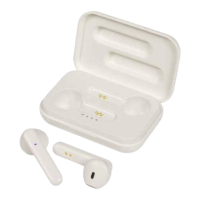
The Digitech Wireless TWS Earphones (AA2143) are true wireless stereo (TWS) earbuds designed for a seamless audio experience with Bluetooth 5.0 technology. They offer a cable-free design, with both the left and right earbuds being Bluetooth enabled, allowing them to be used independently or as a stereo pair. The earphones deliver HIFI sound and are designed for ultra-low power consumption.

Function Description:

These earphones are primarily designed for wireless audio playback and hands-free calling. They connect to smartphones and other Bluetooth-enabled devices, allowing users to listen to music, podcasts, or other audio content, and to make or receive phone calls without the need for physical cables. The TWS design means there are no wires connecting the two earbuds, providing maximum freedom of movement.

Important Technical Specifications:

  • Bluetooth Version: V5.0+EDR (both sides)
  • Bluetooth Modes: A2DP1.3, HFP1.6, HSP1.2, AVRCP1.6, D11.3
  • Bluetooth Frequency: 2.4GHZ
  • Bluetooth Range: 10-15 meters (with no obstacles)
  • Earbud Battery Capacity: 30 mAh rechargeable Li-ion battery
  • Charging Dock Capacity: 300 mAh (optional)
  • Talk/Play Time (Single Earbud Mode): 3-4 hours
  • Talk/Play Time (One Pair Earbuds Mode): 2 hours
  • Standby Time (Single Earbud Mode): 100 hours
  • Standby Time (One Pair Earbuds Mode): 60 hours
  • Sound Quality: HIFI sound
  • Microphone: Included in the right earphone, making it the suggested earbud for single-ear use.

Usage Features:

TWS Pairing:

  1. Power On: Press and hold the power/pairing button on each earphone for 2-3 seconds until a "Power On" voice prompt is heard.
  2. Automatic Pre-pairing: Once both earphones are on, the LED indicators will flash red and blue. After 1 second, the right earphone will flash blue and red, indicating they are ready for smartphone Bluetooth pairing. The earphones are automatically pre-paired by default.
  3. Single Earbud Use: One earphone can be used independently if desired. The right earphone is recommended for single use due to its integrated microphone.

Bluetooth Pairing (to a Smartphone):

  1. Enable Bluetooth: Open your smartphone's settings and ensure Bluetooth is turned on.
  2. Scan for Devices: Scan for available Bluetooth devices. The Bluetooth name (e.g., "****") should appear. The blue LED on the earphones will flash slowly.
  3. Connect: Select the earphones' name from the Bluetooth device list. Your smartphone should indicate a successful connection.
  4. Confirmation: A "Connected" voice prompt will be heard from the earphones.
  5. Automatic Turn-off: The earphones will automatically turn off after 5 minutes if they are too far from your device.

Making Phone Calls:

  • Connection: Ensure the earphones are connected to your mobile phone.
  • Incoming Calls: Both earphones will work during calls. For incoming calls, the calling number will be broadcast.
  • Answering/Refusing Calls: Briefly press the power button once to answer a call. Quickly press the power button once to refuse a call.
  • Redialing: Long-press the power button to redial the last number called.

Listening to Music:

  • Connection: Ensure the earphones are connected to your mobile phone.
  • Play/Pause: Briefly press the power button once to play or pause music.
  • Next Track: Press the power button three times to skip to the next track.

Power Off:

  • Manual Power Off: Long-press the power button until the LED turns red. The Bluetooth device will enter off mode.
  • Automatic Power Off: The earphones will automatically power off if they are more than 5 minutes away from your Bluetooth device, preventing battery drain.

Charging:

  • Low Battery Indicator: A reminding sound will be heard, and the LED will flash red when the battery is low.
  • Charging Indicator: While charging, the LED will be red and turn blue when fully charged.
  • Forced Shutdown: The earphones will automatically shut down when charging, even if they were powered on before charging.

Maintenance Features:

  • Avoid Overuse and Pressure: Do not overuse the earphones or subject them to heavy pressure.
  • Environmental Protection: Keep the earphones away from wet conditions and heat.
  • Interference Avoidance: Keep away from Wi-Fi, routers, or other high-frequency transmitting equipment to prevent signal interruption.
  • Optimal Performance: Use the earphones within their working range of 10 meters. Performance will be better with no obstacles between the connected devices.
  • Compatibility: Use this Bluetooth earphone to connect to any device with Bluetooth functionality.

The product is distributed by Electus Distribution Pty. Ltd. in Australia and is made in China.

DigiTech AA2143 Specifications

General IconGeneral
BrandDigiTech
ModelAA2143
CategoryHeadphone
LanguageEnglish

Related product manuals