EasyManua.ls Logo

DigiTech AR1919 - User Manual

DigiTech AR1919
12 pages
Print Icon
To Next Page IconTo Next Page
Loading...
AR1919
Model:
Quick Start Guide
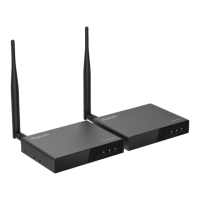
5.8GHz HDMI 1080P
Wireless AV Sender

Questions and Answers

  • K
    katelyn92Aug 11, 2025
    What to do if DigiTech AR1919 Scanner picture is not stable?
    • E
      Edward DiazAug 11, 2025
      If the DigiTech Scanner's picture is unstable or the transmission distance is shorter than expected, it might be due to interference at 5GHz. Try moving the Scanner closer to the source or removing any nearby devices that could be causing interference.
  • J
    Joyce BishopAug 21, 2025
    Why is there no picture out after correct connection at different room with DigiTech AR1919 Scanner?
    • S
      Sarah Wilcox MDAug 21, 2025
      If you're not getting a picture from your DigiTech Scanner after correctly connecting it in a different room, it could be due to signal loss through the walls. Passing through a solid wall (under 30cm thick) can cause a 30% signal loss, reducing the effective distance to less than 70m. If the signal passes through two or more solid walls, the distance might be shorter than 20m. Try shortening the distance or reducing the number of walls the signal has to pass through.
  • W
    Wanda LongAug 31, 2025
    How to match Transmitter and receiver on DigiTech AR1919 Scanner?
    • M
      Michelle MooreAug 31, 2025
      If you're not getting a picture from your DigiTech Scanner even after connecting it correctly in the same room, the transmitter and receiver may not be properly matched. Here’s how to match them: 1. Connect the transmitter and receiver using a 3.5mm male-to-male cable. Connect the transmitter to the input device and the receiver to the display. 2. Power on both the transmitter and receiver. 3. Long press the reset button on the receiver for 10 seconds until the display shows 'searching TX'. 4. Short press the reset button on either the receiver or both sides simultaneously to automatically match the transmitter and receiver. The Link and Status LEDs will flash quickly to indicate a successful connection. If you want to connect more receivers (up to four), repeat these steps.

DigiTech AR1919 Specifications

General IconGeneral
BrandDigiTech
ModelAR1919
CategoryScanner
LanguageEnglish

Related product manuals