4
1 2 3 4 5 6 7
89
10
PRODUCT OVERVIEW
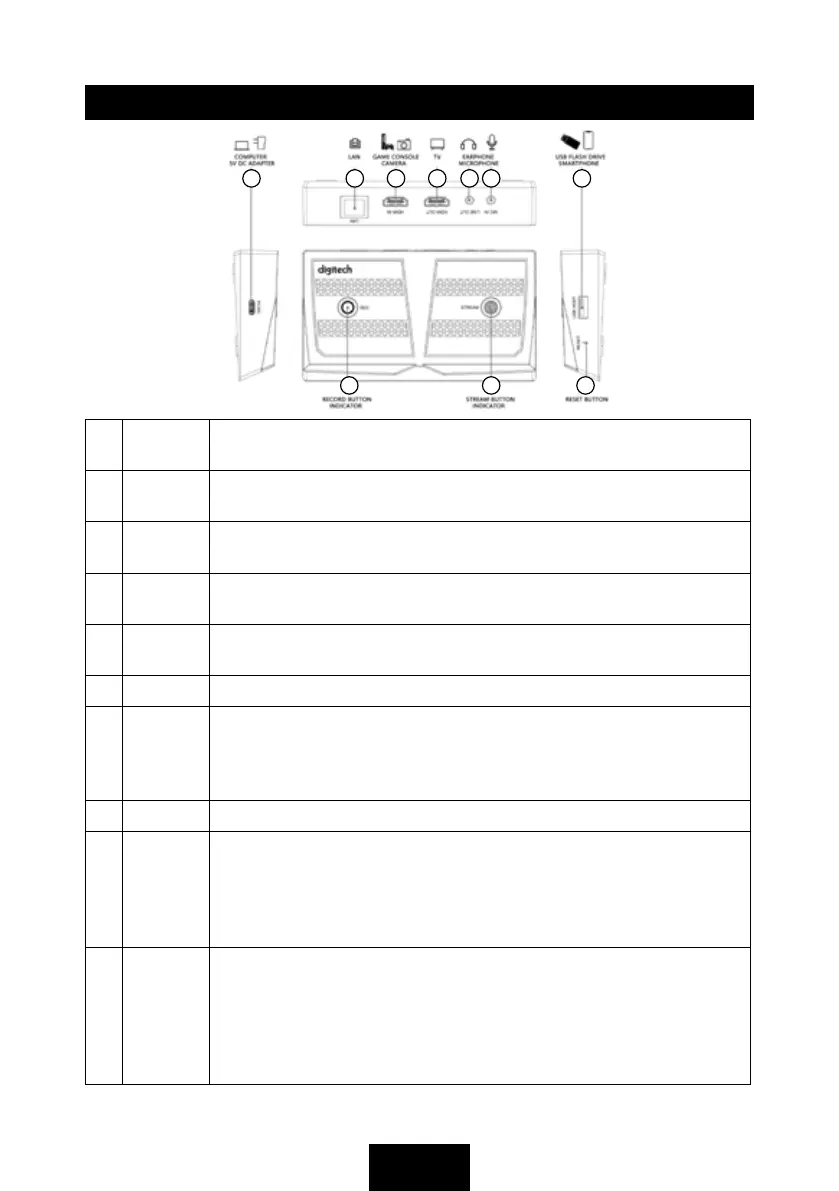
1 PC/DC USB-C port can be either connected to the included mains power supply
or via a free USB port on your computer for capture & streaming.
2 LAN Ethernet port for connecting the device to your network. The indicator will
flash when successfully connected.
3 HDMI IN HDMI input should be connected to the video source, for example a
gaming platform.
4 HDMI
OUT
HDMI output can be connected to a TV or monitor for a live pass-through.
Not required for the device to function.
5 LINE
OUT
3.5mm TRS audio port, connect to earphone or speaker by audio cable.
Does not work when device is connected to a smartphone.
6 MIC IN 3.5mm 3-pole TRS audio port, connect to a microphone to mix sound.
7 USB
HOST
USB host, insert a USB flash drive to save video without a computer.
Please note, the USB drive must be formatted in exFAT or FAT32 formats.
NTFS is not supported. This input can also be used to project from a
supporting mobile device to a TV or monitor.
8 RESET Reset button, press to reset the device.
9 STREAM Stream button for streaming via Ethernet. Press the button to start
streaming, and again to stop. The colour will change depending on the mode.
White (solid): Ready to stream
Red (flashing): Not ready
Green (solid): Streaming
10 REC Record button is used for recording video into a USB flash drive that has
been inserted into the USB Host port. Press to start recording, press again
to stop. The colour will change depending on the mode.
White (solid): Ready to record
Red (flashing): Not ready
Green (solid): Recording



 To Next Page