3 - EN
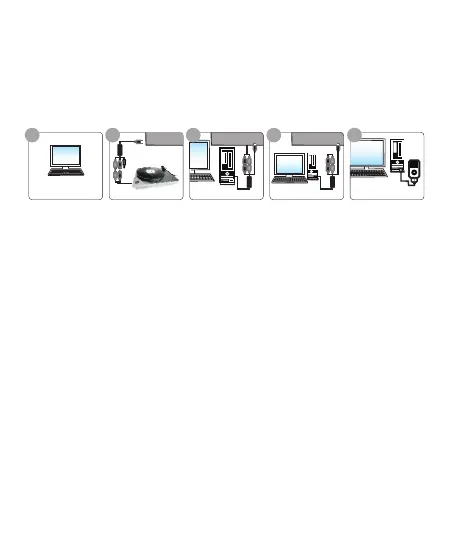
Quick installation chart
Step 1: Installing the application software on the computer.
Step 2: Connect USB Audio Capture with analog audio source.
Step 3: Connect USB Audio Capture with compture.
Step 4: Open audacity software to capture audio and music into your
computer. Edit them with audacity software.
Step 5: Transfer the digital audio files to your ipod iTunes.
Please read the all installation guide clearly.
Please install the device hardware and software following below chart if you
are very busy and want to use the device soon.
Audacity download link: https://audacity.onl/download/
Hardware and software installtion
The Audio Capture device doesn’t need any driver installation, Windows OS
will install the driver automatically. Please connect audio capture USB
connector into your computer’s free USB2.0 port. The system will note
“Found new hardware.” Please wait for a Moment until system will note
“The device is ready to use”. Please check hardware installing correctly.
Right click “My Computer” and select “Properties”, and select “Hardware”
Option, please click “Device Manager” key.
1. Hardware Installation
Install application
Output to iPod by iTunes
To computer
Audio source input
Audio source play
Capture and edit audio
From audio source
Connect to computer
1 2 3 4 5



 To Next Page