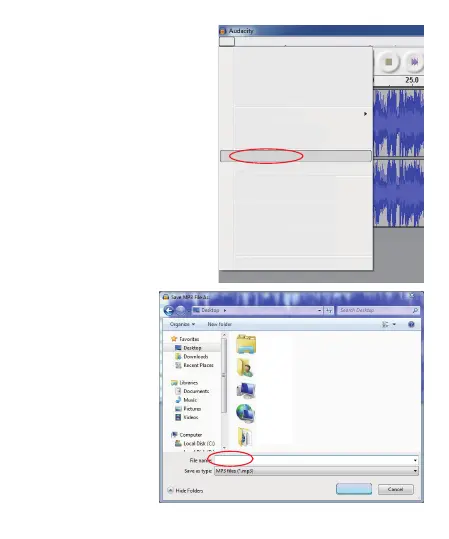
At first time, we need to do more
steps if we want to export as MP3
file.Click “File”, and select “Export
As MP3”.
8 - EN
You need to give one
file name and location
now.
File
Edit View Project Generate Effect Analyze Help
New
Open...
Close
Save Project
Save Project As...
Recent Files...
Export As WAV...
Export Selection As WAV...
Export As MP3...
Export Selection As MP3...
Export As Ogg Vorbis...
Export Selection As Ogg Vorbis...
Export Labels...
Export Multiple...
Page Setup...
Print...
Exit
Ctrl+N
Ctrl+O
Ctrl+W
Ctrl+S
Libraries
System Folder
DR
System Folder
Computer
System Folder
Network
System Folder
ScrToPic
System Folder
01.mp3
Save



 To Next Page