EasyManua.ls Logo

Digitone ProSeries 3 - User Manual

Digitone ProSeries 3
16 pages
Print Icon
To Next Page IconTo Next Page
Loading...
ProSeries 3 Call Blocker
With Back Lighted Display
AUTOMATICALLY BLOCKS AND ROUTES
SCREENED CALLS USING CALLER ID
Patented 10,306,057 & 5,490,210
Full Operations Manual
Copyright 1990-2023 All Rights Reserved. Digitone ProSeries 3 Call Blocker and
Personal Communicator are trademarks of Digitone Communications, LLC
Question and Answer IconNeed help?

Do you have a question about the Digitone ProSeries 3 and is the answer not in the manual?

Overview

The Digitone ProSeries 3 Call Blocker is a personal telephony management device designed to automatically block and route screened calls using Caller ID. It comes preloaded with a patented matrix system to block Anonymous, fake Exchanges, Millions of Out of Area, Private Numbers, and Trillions of Fake Names, making it ready for use right out of the box. The device features a back-lighted display for easy viewing.

Function Description:

The primary function of the ProSeries 3 Call Blocker is to manage incoming calls by blocking unwanted numbers and names, while allowing desired calls to ring through. It requires Caller ID service from your phone company to operate. All calls with a valid phone number (excluding Out of Area or Private) will ring phones connected to the TEL phone port with Caller ID repeated. Blocked calls will not ring these phones, though extension phones connected directly to the phone service will ring once on blocked calls. The device initializes its Clock and Date with the first incoming call displaying Caller ID information.

The device offers several blocking and routing capabilities:

  • Automatic Blocking and Routing: Blocks calls based on preloaded criteria and user-defined lists.
  • Remote Blocking: Users can add a blocked caller to the Caller Lists by dialing * 2 # during or after a call.
  • In-Progress Blocking: To stop a call without answering, users can tap the RED Number or RED Name Block Button after Caller ID is received, saving the number or name to the blocked list.
  • Spoofed Exchange Calls Blocking: Blocks callers using spoofed exchanges (e.g., "555") by setting a string of 3 numbers. Users can also block spoofed last 4 digits of a number.
  • Blocking Unwanted Callers (Code 40): Stores up to 700 core unwanted caller numbers or specific area codes that won't be accidentally erased when clearing memory.
  • Blocking "Private" Calls (Code 48): Blocks calls displaying "Private" as the name, with or without a phone number, even if Anonymous Call Rejection is enabled by the phone company.
  • Blocking "Out of Area" Calls (Code 58): Blocks calls displaying "Out of Area" as the name, with or without a phone number.
  • Symbol Blocking (Code 03#*): Controls non-valid Name parameters presented by scammers, blocking fake Names with "Symbol Blocked" displayed.
  • Inviting Individual Callers (Code 50): Allows users to invite specific numbers or area codes that would otherwise be blocked, storing up to 80 entries.
  • Inviting Callers within a Blocked Area Code (Code 52): Allows inviting specific 10-digit numbers within a blocked area code, storing up to 50 entries.
  • Inviting VIP Callers (Code 60): Programs specific VIP callers (family, friends, business associates) who can ring through at any time, storing up to 80 numbers or area codes.
  • Global Invite (Code 96#*): Invites all callers who display a valid phone number, allowing them to ring through to the TEL phone port.
  • Global Block Method (Code 97#*): Blocks all callers and only allows specific invited numbers to ring through.
  • After Hours Mode: Allows users to set specific times during the day or night when phones connected to the TEL phone port will not ring, directing calls to an optional answer machine or voice mail. VIP callers can still ring through during this mode.

Important Technical Specifications:

  • Patents: Patented under numbers 10,306,057 & 5,490,210.
  • Caller ID Standard: Uses Bellcore FSK Caller ID for landline telephony in North America (USA, Canada, Mexico) and other countries (European Union) that utilize FSK or ETSI Standards. DTMF is also available (Code 17#*).
  • Memory Capacity:
    • Invited Callers: Up to 80 numbers.
    • Invited Callers in Blocked Area Code: Up to 50 numbers.
    • VIP Callers: Up to 80 numbers or area codes.
    • Blocked Callers (Code 40): Up to 700 core unwanted caller numbers.
  • Power: Requires a 24VDC power adapter, which is included.
  • Display: LCD with backlight, adjustable timer (Code 27).
  • LED Indicator: A RED LED light flashes for new incoming calls, unreviewed call records, dialed numbers, and all blocked calls.
  • No Battery Backup Needed: All program settings remain intact even during a power outage.

Usage Features:

  • Setup:
    1. Connect the supplied line cord from the telephone wall jack (or cable modem/VoIP adapter) to the LINE port on the DPS3.
    2. Connect your phone or combo phone system to the TEL phone port of the DPS3. Set phone to 3-5 rings (or 6-7 rings if using voice mail).
    3. Plug the power adapter into the 24VDC port on the DPS3 and then into an AC receptacle.
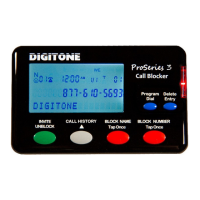
  • Front Panel Buttons:
    • Block Number RED Button: Taps once to block the currently displayed number from Call History. Press and hold to review the "NBR BLOCK LIST" and delete entries.
    • Block Name RED Button: Taps once to block the currently displayed name from Call History. Press and hold to review the "NAME BLOCK LIST" and delete entries.
    • Invite GREEN Button (or Unblock): Press and hold for one second to invite a number ("NBR Invite Saved"). Tap twice quickly to invite a VIP number ("NBR VIP Saved").
    • Delete Entry BLUE (right) Button: Tap once to delete a single number from Call History. Press and hold for 3 seconds to clear the entire Call History ("CID List Deleted").
    • Program Dial BLUE (left) Button: Tap once to dial the number shown on the display. Press and hold for 3 seconds to enter programming mode.
    • Call History GRAY Button: Defaults to displaying the most recent call ("T" icon). Tap to view older calls. Press and hold until the RED LED glows to view newer calls.
  • Programming:
    • Enter programming by pressing and holding the Program button for 3 seconds until "Program Mode" and "Pick Up Phone" are displayed, then wait for a BEEP. Alternatively, take the phone off-hook, get a dial tone, and dial ## or ***.
    • Codes are used to change settings (e.g., Code 27 for LCD Back Lighting Timer, Code 30 for Standard Mode, Code 40 for Blocking Unwanted Callers).
  • Viewing Caller Lists: Enter programming and use specific codes (e.g., Code 21 for Spoofed Exchange Call list, Code 41 for Blocked Caller list, Code 51 for Invited Caller list) to review stored numbers.
  • Wildcarding (#): Use the # key in programming commands to represent any number in a phone number's column for broader blocking or inviting.
  • Sort Processing Levels (Code 04#*): Three levels (L1, L2, L3) to defeat targeted attacks from scammers, prioritizing different blocking/inviting lists.
    • L1 (Default): Processes Invited/VIP Numbers first, then Blocked Names, then Spoofed Exchanges.
    • L2: Processes Blocked Names List first, then Invited/VIP Numbers, then Blocked Numbers, then Spoofed Exchanges.
    • L3: Processes specific Spoofed Exchanges first, then Blocked Numbers, then Blocked Names.
  • VoIP Time Option (Code 95): Manually set the clock and date for VoIP phone services.

Maintenance Features:

  • Deleting Stored Code 40 Blocked Numbers: When attempting to delete numbers stored with Code 40, they will display "Can Not Delete" unless their status is changed to NBR BLOCK LIST by pressing the GREEN Invite button, then Delete Entry.
  • Clearing Blocked Numbers List Only (Code 40 # *): Deletes accumulated blocked numbers from using the Block Button or remote entry, but retains known unwanted blocked entries stored through programming Code 40.
  • Blocked Number List Auto Delete (Code 46): Enables First In, First Out processing for the blocked calls list, automatically deleting older calls as newer ones are received (700 memory slots). Code 47 disables this.
  • Reset DPS3 Call Lists Settings (Code 98#*): WARNING: Deletes ALL Names and Numbers from all lists.
  • Reset DPS3 User Settings (Code 99#*): Resets user settings to factory defaults without deleting call lists.
  • Service and Repair: In case of defects, contact Digitone at 1-877-610-5693 to obtain a Return Merchandise Authorization (RMA). The product should be shipped freight prepaid with evidence of authorization.
  • Website Support: FAQ's and support are available at http://www.digitone.com.

Digitone ProSeries 3 Specifications

General IconGeneral
BrandDigitone
ModelProSeries 3
CategoryTelephone Accessories
LanguageEnglish

Related product manuals