© 2017 Digitrax, Inc. www.digitrax.com 18
18
8.0 Using the DB210/220 as an auto reversing booster
e DB210/220 can be congured as an auto reversing booster. e DB220 dual
booster can be congured so that 1 or both of it’s boosters are congured for
auto reversing. With the DB210 setting the switch to ON will cause the booster
to be auto reversing. With the DB220 dual booster you have the option of either
conguring either one or both of the boosters to be auto reversing. Set the
AUTO REV switch to 1 and the R1A and R1B track outputs will be auto revers-
ing. Set the AUTO REV switch to 1&2 and both R1 and R2 track outputs will be
auto reversing.
In order for auto reversing to work a reference booster must be used. is can
be either your command station or another booster. In the case of the DB220
when only R1A and R1B output are set for auto reversing the R2A and R2B
outputs can be used as the reference booster. Visit www.digitrax.com for more
information on auto reversing.
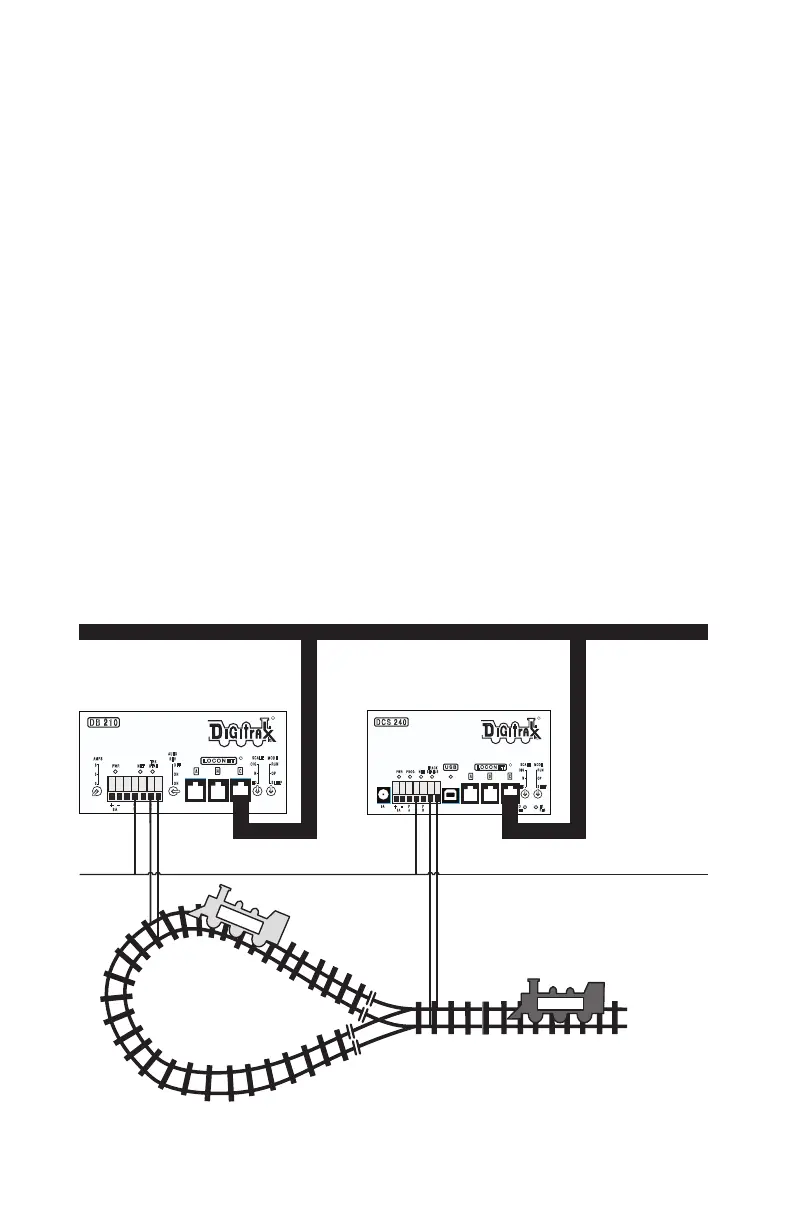
Use the gure 2 as a guide to conguring the DB210/220 for Reverse Loops.
Note that the DB210/220 connections to the track are NOT directly connected
to the track of any other booster or command station on your layout. In every
case Digitrax requires double gapped isolation for each booster and command
station.
DCC
DCC
DB 210
R
LOCONET
A B
R
C
MODE
RUN
OP
SLEEP
SCALE
O/G
N
HO
AMPS
8
5
3
PWR NET
TRK
STAT
+
G
R
R
B
R
A
-
8A
AUTO
REV
OFF
ON
ON
EZ
RTS
DCS 240
R
LOCONET
A B
R
C
USB
PWR PROG NET
TRACK
STATUS
MODE
RUN
OP
SLEEP
SCALE
O/G
N
HO
+
P
A
G
R
P
B
R
B
R
A
5A
LOCO
RESET
-
8A
Double
Gap
Double
Gap
LocoNet
General Return
DCS240 Command
Station/Booster (System
Reference)
DB210 Booster (Set for
Auto Reversing)
Note: Some wiring omitted for
clarity
Figure 2: Using a DB210 for Auto Reversing



 To Next Page