12
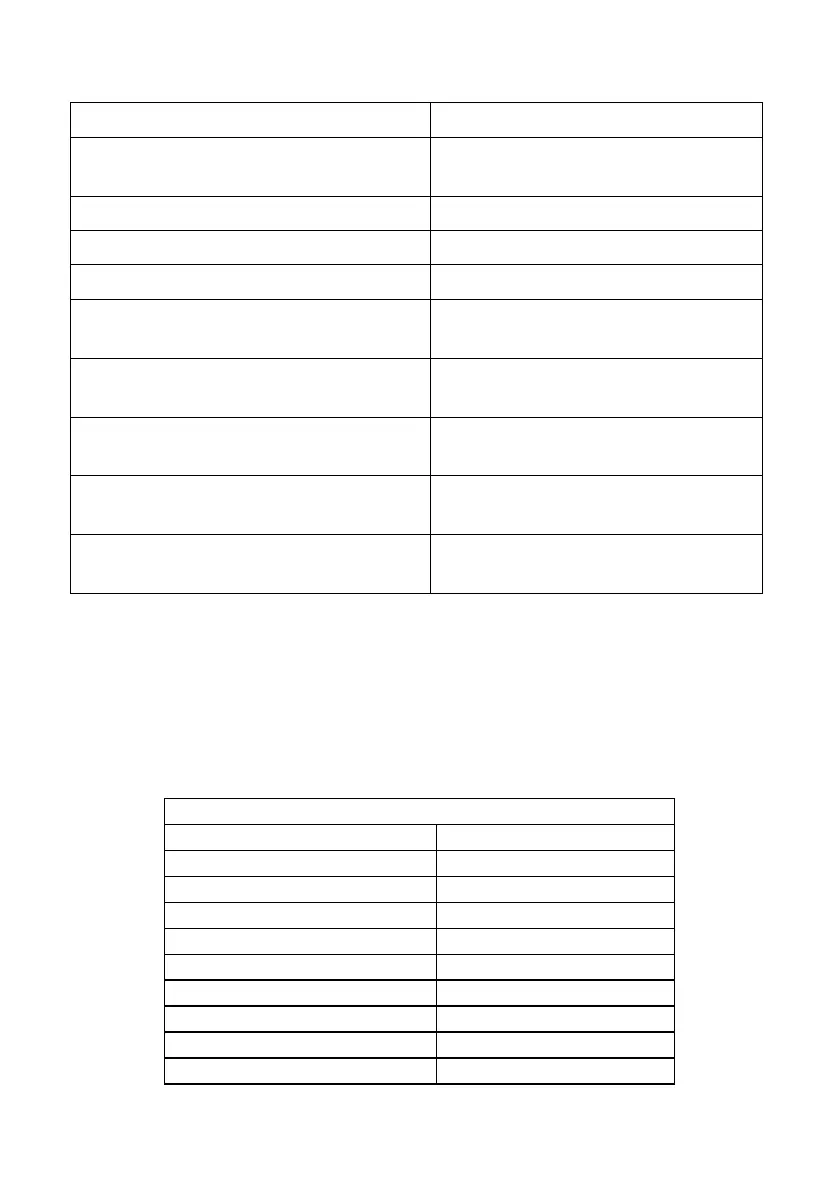
4. [ CAPS ] + [ CAPS ] mode
[ CAPS ] [ CAPS ] [ 1 ] or [ 2 ] or [ 3 ] or [ 4 ]
Switch to the computer corresponding
to
the port of [ 1 ] [ 2 ] [ 3 ] [ 4 ]
[ CAPS ] [ CAPS ] [ → ] or [ ↓ ]
Switch to the next computer
[ CAPS ] [ CAPS ] [ ← ] or [ ↑ ]
Switch to the previous computer
[ CAPS ] [ CAPS ] [ S ]
Automatic switching mode, the default
is
5seconds, press [ ESC ] to exit
[ CAPS ] [ CAPS ] [ S ] [ N ]
Set the automatic switching mode
interval, press [
ESC ] to exit
[ CAPS ] [ CAPS ] [ SCROLL ]
Switch to [ SCROLL ] [ SCROLL ] hotkey
combination mode
[ CAPS ] [ CAPS ] [ NUM ]
Switch to [ NUM ] [ NUM ] hotkey
combination mode
[ CAPS ] [ CAPS ] [ CTL ]
Switch to [ CTL ] [ CTL ] hotkey
combination mode
Note:
1. The detection time of each hotkey is 5 seconds. If you press [ CTL ]
after 5 seconds after pressing [ CTL ] for the first time , this key combination will
be invalid input.
2. In the combination key, [ N ] represents the number key [ 1 ] ---- [ 9 ], the number
of seconds in the time interval can be set, as shown in the following table:
Automatic switching interval


 To Next Page