TIME SET
GETTING STARTED
POWER SUPPLY
1. Press and hold “SET” to start me seng.
2. Seng order is : language 12/24 hour year (2000-2099) D/M or
M/D month day hour min exit.
3. Press “up” once, the seng item will increase by one unit, press and hold
“up”, the seng item will increase by 8 units/second.
4. Press “down”once, the seng item will decrease by one unit, press and
hold “down”, seng item will decrease by 8 units/second.
5. No buons are pressed for more than 20 seconds, seng mode will be
exited and returned to me mode.
1. Press and hold“alarm” to start alarm seng.
2. Seng order is: alarm1 (1-5) hour alarm1 (1-5) min alarm2 (6-7) hour
alarm2 (6-7) min exit.
3. Press “alarm” to confirm the seng and move to next seng item.
4. Press “up”once, the seng item will increase by one unit, press and hold
“up”, seng item will increase by 8 units/second.
5. Press “down” once, the seng item will decrease by one unit, press and
hold “down”, seng item will decrease by 8 units/second.
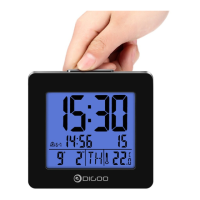
6. At normal mode, press “up” to turn on/off alarm1 (1-5). If the alarm 1 is on,
this symbol will show on the display to remind user that work day alarm
is working.
7. At normal mode, press “down” to turn on/off alarm 2 (6-7). If the alarm 2 is
on, this symbol will show on the display to remind user that weekend
alarm is working.
6. No buons are pressed for more than 20 seconds, seng mode will be ex-
ited and returned to me mode.
IMPORTANT: There are two alarm modes on the clock:
Weekday alarm (Monday to Friday) “1-5” displays on the LCD
Weekend alarm (Saturday & Sunday) “6-7” displays on the LCD
1. Remove the baery compartment cover.
2. Insert 1 x AA baery matching the correct polarity(+/-).
(Note: When the clock is first powered by the baery, all of the segments of the
LCD display and the blue LED backlight will go on for 2 seconds. This is normal.)
ALARM SET


 To Next Page
 Loading...