EN-13
Menu Structure 8.3
English
8.3 History
The “History” menu can be used to query the runtimes of the
compressor(s), circulating pumps and further components in the
heat pump heating system.
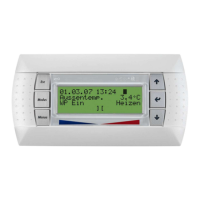
You can access the history menu by:
Pressing the button (MENU) for approx. 5 seconds
Select the menu item HISTORY with the arrow buttons and
confirm with the ENTER button (
↵).
Depending on the system configuration, the following data is
available:
Display of runtimes and stored data Display
Total runtime of compressor 1 Always
Total runtime of compressor 2 2 compressors
Total runtime of 2nd heat generator Bivalent or mono
energy
Total runtime of the brine circulating pump or well pump. The
runtime is greater than the total of the compressor runtimes
because of pump forerun and afterun.
BW or WW HP
Total runtime of the ventilator. The runtime is less than the total of
the compressor runtimes because of the defrosting process (the
ventilator is switched off during defrosting).
AW HP
Total runtime of the heat circulating pump Always
Runtime of the compressor in cooling operation Reversible HP
Total runtime of the hot water circulating pump Hot water
Total runtime of the swimming pool circulating pump Swimming pool
Runtime during which the flange heater was additionally switched
on for DHW preparation
Hot water
sensor
immersion heater
Displays the last fault which occurred with the date, time and
cause
Always
Displays the second to the last fault which occurred with the date,
time and cause
Always
Displays the start and end of the last, fully completed initial heating
program
Always
Displays the start and end of the last, fully completed screed drying
program
Always
The quantity of thermal energy supplied by the heat pump is
totalled and displayed.
Thermal energy
meter
Internal
The pulses detected at digital input N1/J7-ID12 are added together
when the heat pump is operating in heating mode.
Thermal energy
meter
External
The pulses detected at digital input N1/J7-ID12 are added together
when the heat pump is operating in domestic hot water mode.
When an additional heat exchanger is used, the pulses at digital
input N2/J5-ID6 are added together during domestic hot water
preparation.
Thermal energy
meter
Hot water
The pulses detected at digital input N1/J7-ID12 are added together
when the heat pump is operating in domestic hot water mode.
When an additional heat exchanger is used, the pulses at digital
input N2/J5-ID6 are added together during domestic hot water
preparation.
Thermal energy
meter
Swimming pool


 To Next Page