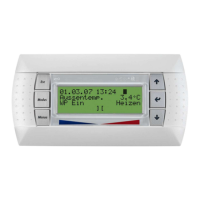
EN-10
8.2
English
8.2 Operating Data
All current operating statuses are displayed in the "Operating
data" menu item.
You can access the operating data menu by:
Pressing the button (MENU) for approx. 5 seconds
Select the menu item OPERATING DATA with the arrow
buttons and confirm with the ENTER button (
↵).
Depending on the system configuration, the following data can
be queried in the “Operating data” menu:
For each day of the week, it is possible to select whether Time1,
Time2, no time or both times are to be active when the
temperature is lowered. Operations to lower the temperature that
exceed a weekday are activated or deactivated at the end of each
day accordingly.
N
T1
T2
Y
Sets the date, year, day, month and weekday
The language for menu navigation can be selected from the
available languages
DEUTSCH
ENGLISH
FRANCAIS
ITALIANO
NEDERLAND
PORTUGUES
POLSKY
SVENSKA
SLOVENSKO
ESPANOL
CESKY
SUOMI
NORSK
System-specific parameters Setting range
Display of sensor and system values Display
The external temperature is used for calculating the return set
temperature, for frost protection functions and for defrosting
Always
Displays the calculated return set temperature for heating circuit 1 Not with silent
cooling, only with
reversible HP
Displays the return flow temperature of heating circuit 1 measured
on the sensor. This temperature is the controlled variable for
heating circuit 1.
Always
Displays the flow temperature measured on the sensor. This
temperature is used for frost protection functions and for
safeguarding defrosting.
Air HP or sensor
connected
Displays the calculated set temperature for heating circuit 2 Heating circuit 2
heating operation
Displays the minimum temperature possible with silent cooling,
calculated from the dew point plus dew point distance
Cooling operation
Silent cooling
only, reversible
HP
or HC2
Displays the temperature of heating circuit 2 measured on the
sensor.
This temperature is, among other things, the controlled variable for
heating circuit 2.
HC2 or
cooling operation
with silent-only
cooling with
reversible HP
Displays the calculated set temperature for heating circuit 3 Heating circuit 3
heating operation


 To Next Page