Need help?
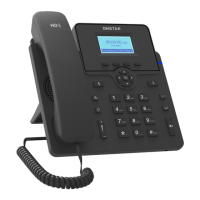
Do you have a question about the Dinstar C60U Series and is the answer not in the manual?
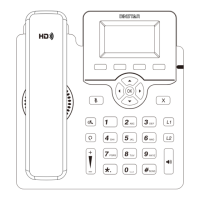
Overview of LCD screen, power indicator, line keys, soft keys, hookswitch, and keypad functions.
Steps to attach the stand to the IP Phone for stable placement.
Guide for connecting essential cables like handset, headset, PC, and power supply.
Instructions on how to insert a SIM card into the designated slot.
How to perform call operations and basic settings directly on the phone's interface.
Manual configuration of network parameters like IP address, subnet mask, and gateway.
Inputting essential account details such as register name and user name for registration.
Methods to access the phone's web interface for advanced configuration.
Instructions for initiating calls using the handset, speakerphone, or headset.
How to receive incoming calls using the handset, speakerphone, or headset.
Procedures for terminating active calls with handset, speakerphone, or headset.
How to redial previously called numbers from the call history.
Functionality to mute or unmute the microphone during a call.
How to put an active call on hold using the Hold soft key.
Steps to retrieve a call that has been placed on hold.
Procedure for transferring an active call to another number.
Configuration of different call forwarding types: Always, Busy, and No Answer.
How to configure and use speed dial keys for quick dialing.
Setting up and using the hotline feature for automatic dialing.
Viewing, managing, and performing actions on call history entries.
Adding, viewing, and deleting contacts in the local phonebook.
Adjusting receiver, ring, and microphone volumes via keys or settings menu.
Selecting and setting desired ring tones for incoming calls.
 General
| Type | IP Phone |
|---|---|
| SIP Accounts | 6 |
| HD Audio | Yes |
| Operating Humidity | 10% to 90% non-condensing |
| Audio Codecs | G.711, G.722, G.729, iLBC |
| Network Interface | 10/100/1000Mbps Ethernet |
| Features | Call Hold, Call Waiting, Call Transfer, Call Forward, 3-way Conference, BLF, Intercom, Paging, Redial, Call Park, Call Pickup, Hotline, Voicemail |
| Protocols | SIP, RTP, RTCP, HTTP, HTTPS, TFTP, DHCP, DNS, NTP, STUN |
| Ethernet Ports | 2 |
| Bluetooth | Yes |
| USB Ports | 1 |
| Headset Port | Yes |
| Operating Temperature | 0°C to 40°C |
| Model | C60U Series |

 To Next Page