Need help?
Do you have a question about the Dinstar C60S and is the answer not in the manual?
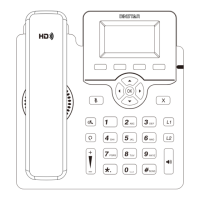
Displays call status, account, messages, time, date, and other information.
Shows power status, call alerts, and message notifications.
Used to activate accounts and configure various phone functions.
Buttons whose functions change based on LCD display.
Manages handset connection and call state.
For inputting numbers, letters, and special characters.
Instructions for attaching the phone stand for optimal viewing angle.
Guides on connecting handset, headset, PC, and power.
Customize settings using the IP phone's LCD and keypad.
Access and manage phone settings through a web browser.
Step-by-step guide to initiating calls via handset, speakerphone, or headset.
Instructions on how to receive incoming calls using different modes.
Procedures for terminating calls using handset, speakerphone, or headset.
How to redial previous numbers from the call history.
How to mute and unmute the microphone during a call.
Managing active calls by placing them on hold and resuming them.
How to transfer an active call to another number.
Setting up call forwarding based on availability or specific conditions.
Configure and use speed dial keys for quick dialing.
Set up a hotline number for automatic dialing upon picking up the handset.
Enabling and configuring the DND feature to block incoming calls.
Accessing, managing, and interacting with call history records.
Adding, deleting, and managing contacts in the local phonebook.
How to adjust receiver, ring, and other volume settings.
Selecting and setting different ring tones for incoming calls.
 General
| Model | C60S |
|---|---|
| Type | IP Phone |
| SIP Accounts | 6 |
| Audio Codecs | G.711, G.722, G.729, iLBC |
| Power Supply | DC 5V or PoE |
| Features | Call Forwarding, Call Transfer, Call Hold, Call Waiting, 3-Way Conference |
| Protocols | SIP, RTP, RTCP, HTTP, HTTPS, DHCP, DNS, NTP, ARP, ICMP, TCP, UDP |
| PoE | 802.3af |
| USB Ports | 1 |
| Headset Port | Yes |
| Humidity | 10% to 90% |

 To Next Page