(314) 205-3033 WWW.DIODEDYNAMICS.COM
4. Connect the remote control power to the Signal Wire. Next, tap the Signal Wire to any 12V
power source. The black wire must be grounded before any function will work.
5. Mount drivers and controllers, and tuck all wires. Drivers should be mounted outside of
headlight for serviceability, in a location away from the engine block to avoid excessive heat
buildup.
6. Test thoroughly, reseal headlight and reinstall onto vehicle.
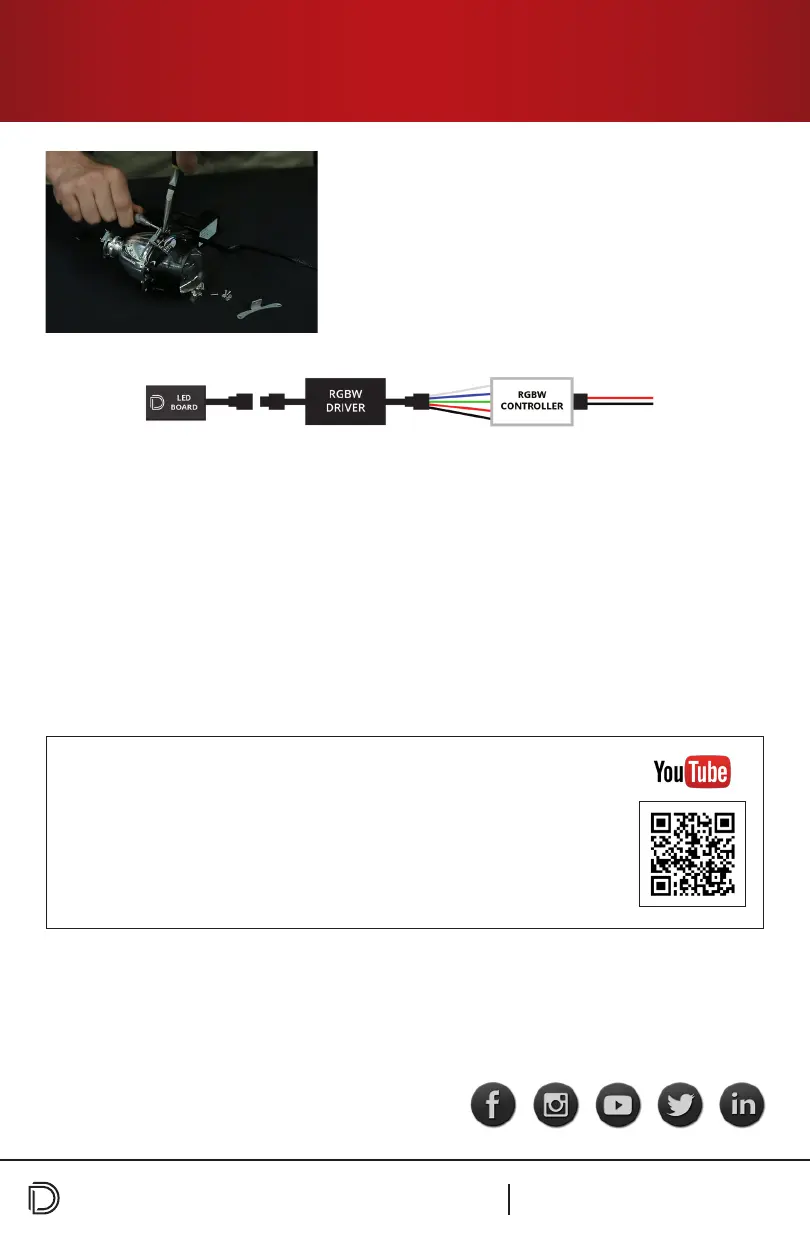
3. Connect each Demon Eye connector to the RGBW
Drivers. Next, take the bare wires from the RGBW
Driver and connect them to the RGBW Controller. All
wires must be inserted into the corresponding slot on
the controller in order for the boards to work (i.e. all
white wires must be inserted into the white slot, etc.).
See wiring method diagram below.
PAGE 2
RGBW™ Demon Eyes (Universal)
Installation Guide
IMPORTANT: DO NOT plug the LED panel directly into the controller without the
driver. The LEDs must be plugged into the driver rst to control the power.
Please contact Diode Dynamics should you have any questions about the installation
or wiring process, at 314-205-3033 (9a-5p CST) or contact@diodedynamics.com.
Scan the QR code to link to our installation video online!
NEED MORE HELP?
We’ve taken the time to test our products on your vehicle. We can
guarantee compatibility and tment the rst time – no guessing
game! If you need more help with installation, watch our step-by-step
video to walk you through the process.
GUARANTEE
100% SATISFACTION
Visit www.diodedynamics.com to nd more products for any vehicle.
WARRANTY
3 YEAR


 To Previous Page