Dionex ICS-6000 Installation Instructions
66
Doc. 22181-97001 02/18
3.9 Installing the Tablet
This section contains instructions for attaching the tablet to the DC. The
procedure requires parts from two kits:
•
The Tablet Kit (P/N 22181-62020) contains the tablet and its power
supply. When the tablet is purchased from Thermo Fisher Scientific, the
ICS-6000 App is installed on the tablet at the factory and a predefined
user account is created.
•
The Tablet Arm/Holder Kit (P/N 22181-62016) contains the parts
required to attach the arm and holder assembly to the DC.
Installation of a Third-Party Tablet
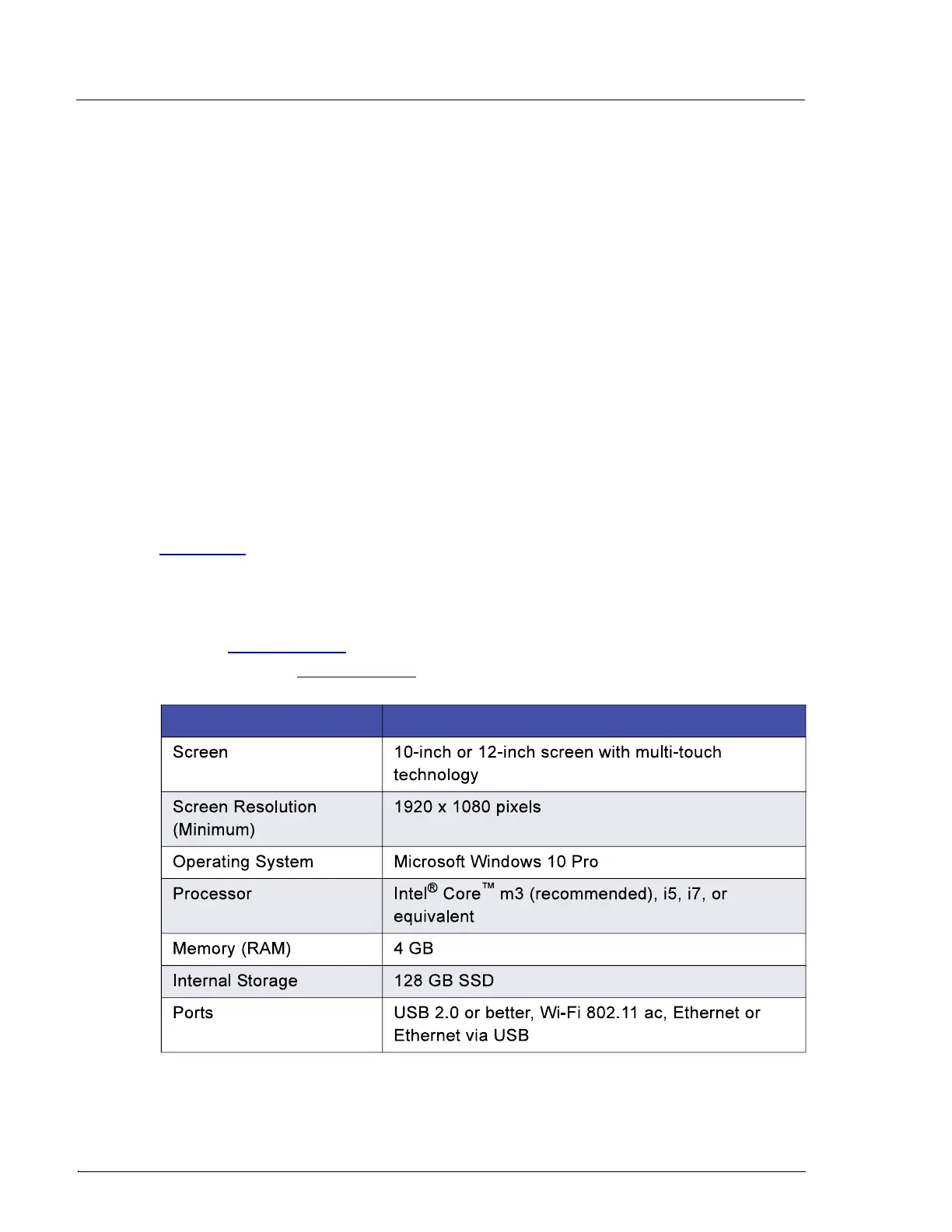
When the tablet is purchased separately from the Dionex ICS-6000, you are
responsible for making sure the tablet meets current specifications (see
Table 3-3).
NOTE
If you do not purchase the tablet from Thermo Fisher Scien-
tific, you must also install the ICS-6000 App (see
Section 3.11.1) and manually pair the tablet and instrument
PC (see Section 3.12.2).
Specification Requirement
Table 3-3. Tablet Specifications


 To Next Page
 Loading...