us.diono.com/installation-videos
1-855-463-4666
62
63
HARNESS STRAP REMOVE/REPLACE HARNESS STRAP REMOVE/REPLACE
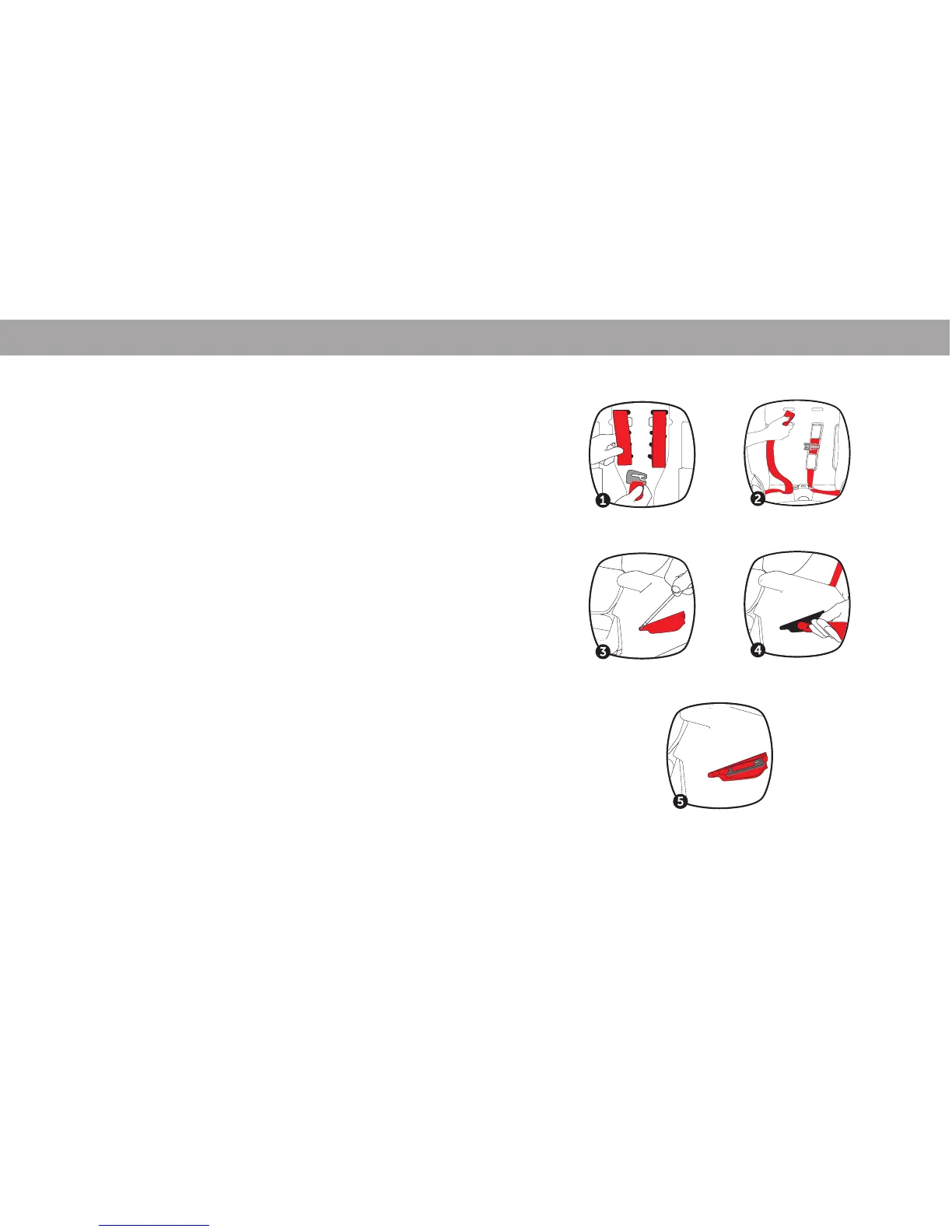
1. Unzip Back Seat Cover to access harness. Remove
harness straps from the metal hook.
2. Pull the harness straps out from the back of the seat
and remove the Chest Clip and Harness Pads from
each side. Slide the harness strap out of the buckle
tongues.
3. Using a Phillips head screwdriver, take out the
screws and remove the access panel shown. Remove
old harness straps from seat.
4. Insert new harness strap through the slot shown
and pull the strap up.
5. Once the strap is pulled up until the metal D-ring
is located as shown, re-fasten and close the access
panels in step 3.
Slide the new harness straps through the buckle
tongues, re-attach the chest clip and reinstall the
harness pads.
Slide the harness straps through to the back of the seat
and re-install them to the metal hook in Step 1.





 To Next Page