Chapter 2
35
SETTINGS Front Panel
Resolution Indicators
Remote Control Unit
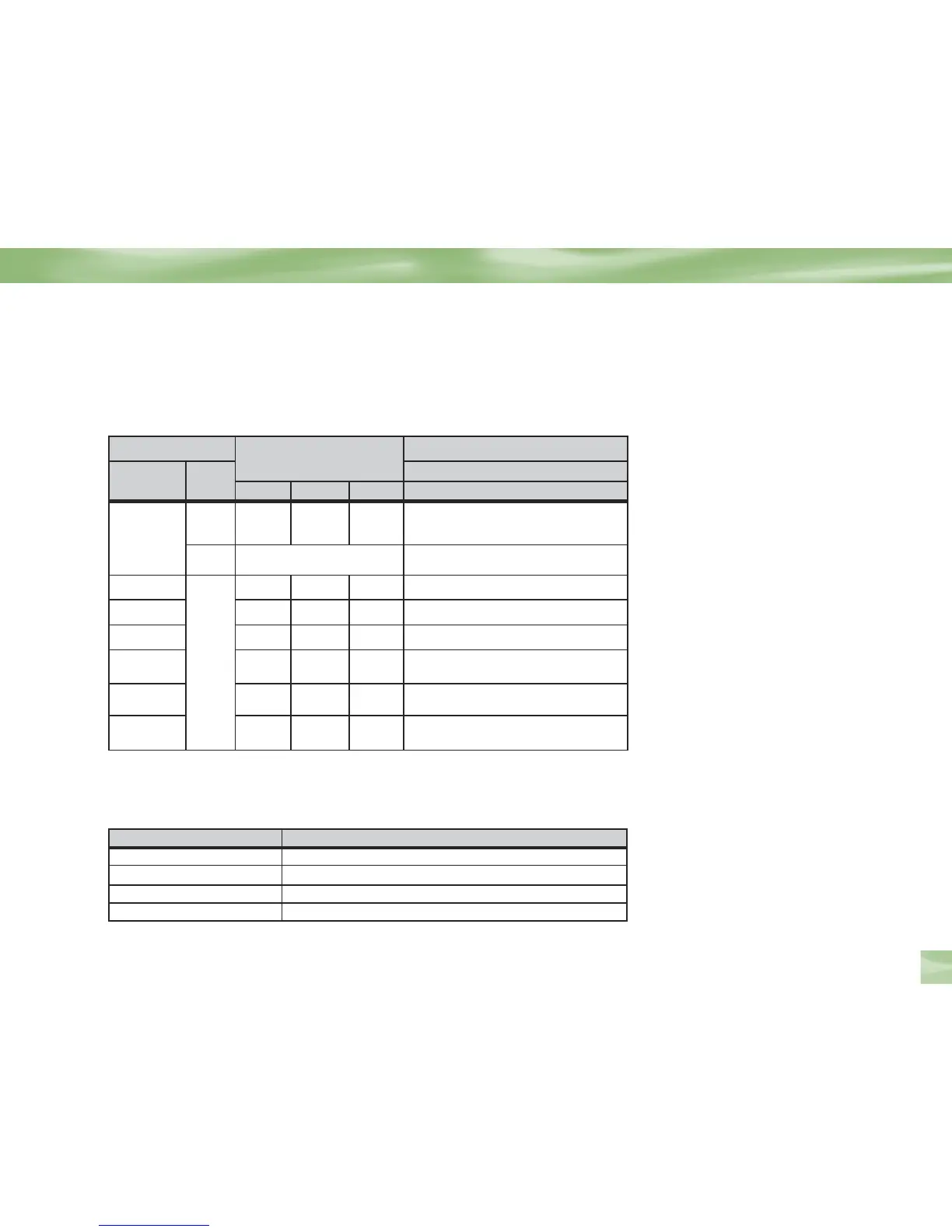
Resolution Native FORMAT Key Cycle
480i/p 720p 1080i 4:3
All Off ON ON ON 480i/p/Letter, 480ip/Full, 480ip/Zoom,
720p/Letter, 720p/Full, 720p/Zoom,
1080i/Letter, 1080i/Full, 1080i/Zoom
On
Auto (IRD determines
the resolution LED)
Native/Letter, Native/Full, Native/Zoom
480i/p
N/A
ON OFF OFF 480ip/Letter, 480ip/Full, 480ip/Zoom
720p OFF ON OFF 720p/Letter, 720p/Full, 720p/Zoom
1080i OFF OFF ON 1080i/Letter, 1080i/Full, 1080i/Zoom
480i/720p ON ON OFF
480ip/Letter, 480ip/Full, 480ip/Zoom,
720p/Letter, 720p/Full, 720p/Zoom
480ip/1080i ON OFF ON
480ip/Letter, 480ip/Full, 480ip/Zoom,
1080i/Letter, 1080i/Full, 1080i/Zoom
720p/1080i OFF ON ON
720p/Letter, 720p/Full, 720p/Zoom
1080i/Letter, 1080i/Full, 1080i/Zoom
In case of TV ratio 16:9, “Pillar” box will be displayed
instead of “Letter”.
Default Value is 480ip and 4:3/Letterbox
Front Panel LED can change when cycling using FORMAT key on the remote.
LED can change in response to a change in the Resolution setting in System Setup.
Output Connection Available Formats
YPbPr 1080i/720p/480p/i/Native
HDMI 1080i/720p/480p/i/Native
S-Video 480i
Video (RCA Type/Yellow) 480i
The DIRECTV
®
HD Receiver provides several display formats as shown in the following
table. It also shows the formats available at each output terminal.
Guided Setup and Activation



 To Next Page