I
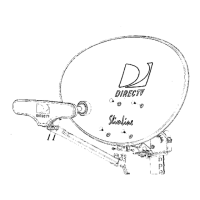
e Attaching LNB to Antenna SatB, SatC, .
1190 1100 Sat A,
The triple-head LNB has four identical outputs, each 1010
supporting one independently operating receiver. To simplify , ,
future installation of additional receiver(s), you may want to:' ',\:'
route more cables to the antenna at this point. Only one cable: \,,---~
is needed for antenna fine-tuning and alignment. : ! '
\ I
.RG 6 cable from the grounding block can now be routed to \\ "
" ' ,
the LNB on your antenna. Attach the triple-head LNB onto "
the LNB Arm and fasten with included mounting hardware """" ~~ '
~ (Philip screws and nuts). Dress cable with enclosed tie
wraps, allowing for cable water drip loop if necessary.
H k"
bJ,I h ) to th LNB d Ita h" th LNB00 Ing up ca es ,one sown e an acing e
to Antenna -up to four cables can be connected this way.
~ Aiming and
~ Fine-tuning Antenna
When you fine-tune the antenna to one satellite, the other two
satellites should be aligned automatically. Plug in and turn on
" Align the
your receiver. Azimuth
.Use the on-screen signal strength meter to fine-tune the
antenna. It is important to obtain the strongest signal
[ ::J~J possible; the higher the signal strength, the less likely you
are to experience signal outages during adverse weather. .0
.With a cell phone and house phone, ask someone to relay
signal strength values to you, or hook-up a portable TV at the
installation site. Your receiver may be equipped with an
audible beep tone feature; the higher pitch, the higher the
signal. A hand-held signal meter is also an option.
Align the Azimuth = =
~I. ".. .., I~
.Set your on-screen menu to the signal meter mode, on ~ ~
Satellite A (1010). Use a transponder that is unique to
~...: Sat A (such as 1 -6, 16) for your alignment. Point the :~:
antenna to a generally southerly direction, or use the ::.~:
Azimuth number obtained in Step 1 and a compass for
a more precise starting point.
.Very slowly rotating the antenna around the mast a few
degrees at a time, pause 3 -5 seconds in between for signal
strength meter update. You should be able to find the
satellite signal first and then the signal peak, indicated on I
your screen. Once you sweep through the peak-signal point " "
I I
on the screen, stop. You may want to swing past the peak : :
point a couple of times to make sure. ','
Pencil Marks'
.Mark the mast and antenna bracket point with a pencil. ",
" ,
" "
'-- --
DIRECTV Multi-Satellite Dish Antenna 9


 To Next Page
 Loading...