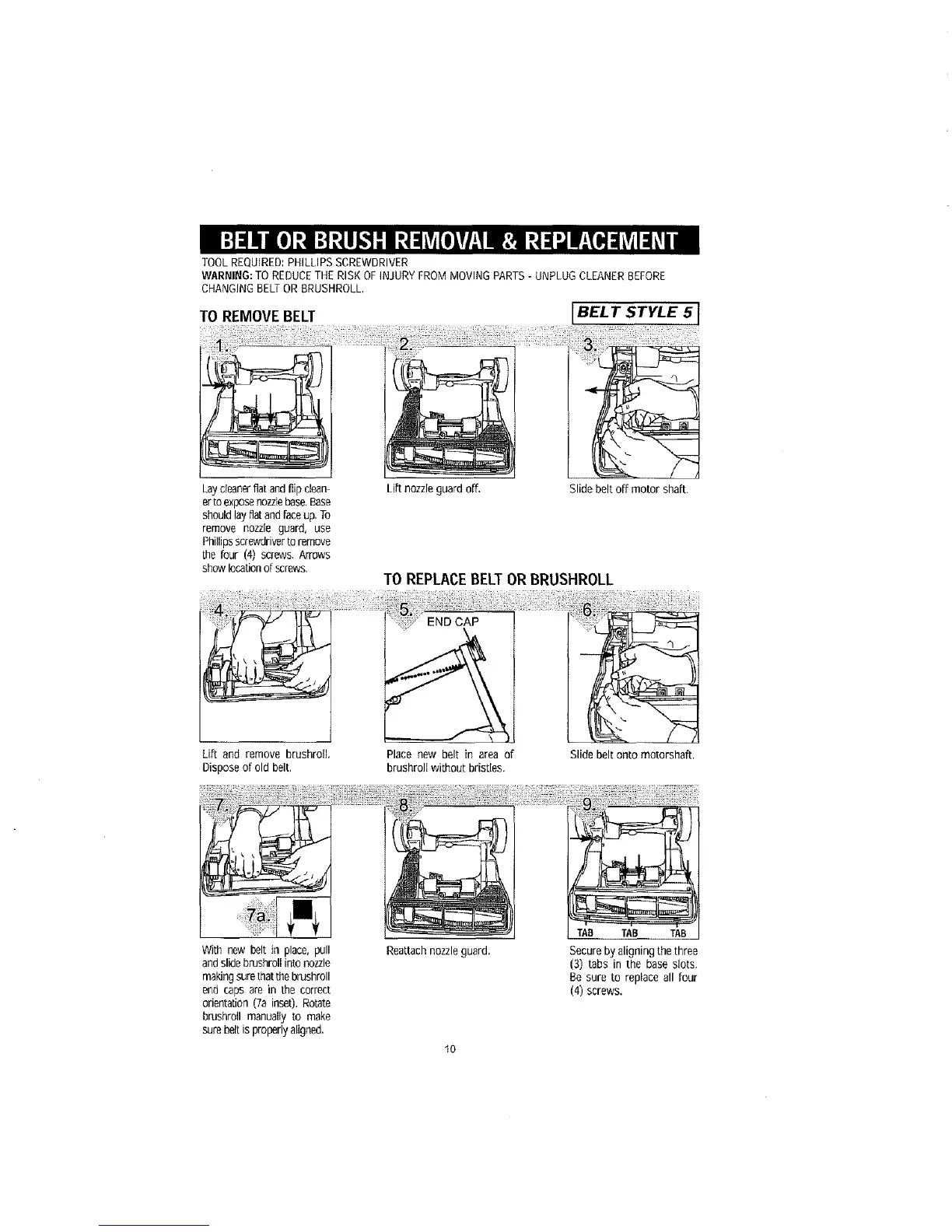
TOOLREQUIRED:PHILLIPSSCREWDRIVER
WARNING:TO REDUCETHERISK OFINJURYFROMMOVINGPARTS- UNPLUGCLEANERBEFORE
CHANGINGBELTORBRUSHROLL,
TO REMOVEBELT IBELT STYLE 5 1
Laycleanerfiatandflipclean-
erto exposenozzlebase.Base
shouldlayfiatandfaceup.To
remove nozzle guard, use
Phillipsscrewdriverto remove
the four (4) screws. Arrows
showlocationof screws,
Lift and remove brushroll,
Disposeof old belt,
Lift nozzle guard off.
Slide belt off motor shaft.
TO REPLACEBELTORBRUSHROLL
Place new belt in area of
brushroltwithout bristles.
Slide belt onto motorshaft.
With new belt in place, pull
andslidebrushrollintonozzle
makingsure[hatthebrushroll
end caps are in the correct
orientation(7ainset).Rotate
brushrolI manuallyto make
surebeltisproperlyaligned.
Rea_achnozzleguard.
10
TAB TAB TAB
Secureby aligningthe three
(3) tabs in the base slots.
Be sure to replaceall four
(4) screws.



 To Next Page