10
5 Maintenance
5 Maintenance
5.1 Emptying and cleaning the dust bin
It is best to empty the dust bin module after each vacuuming session.
However, empty the dust bin at the latest
- when the "MAX" mark (Fig. 9/B1) has been reached,
- the cleaning indicator (Fig. 1/26) lights up or
- before long-term storage or dispatch.
1. Switch off the appliance, chapter 4.3, "Switching off".
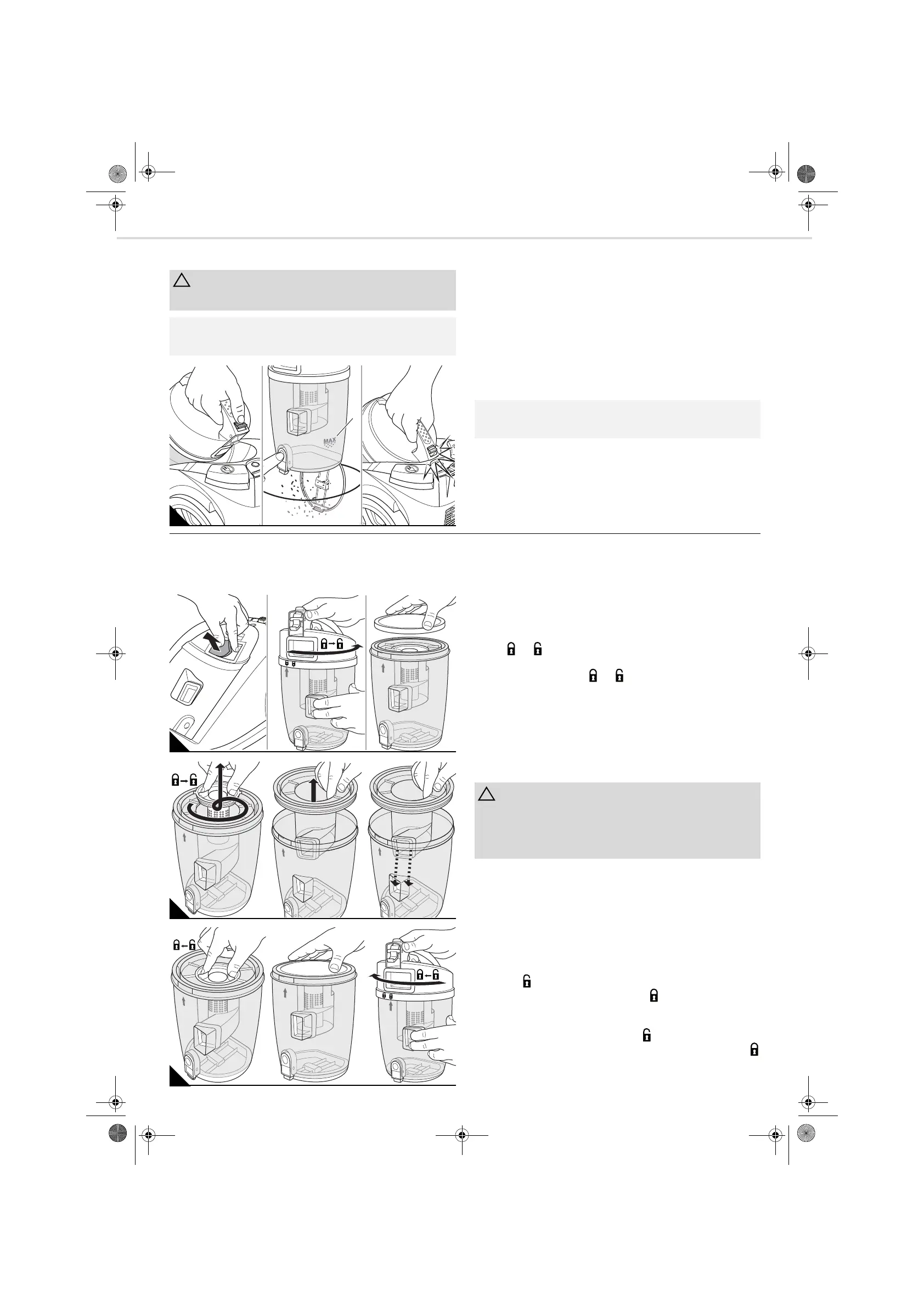
2. Push the release catch for the dust bin (Fig. 9/A).
3. Remove the dust bin by pulling it upwards out of its console.
4. Empty the dust bin by holding it low over a waste bin. Do not press the
emptying button until you have done so (Fig. 9/B).
5. Remove any residual dust from the dust bin using a dry cloth or a soft
brush, e.g. the supplied furniture brush.
6. Close the dust bin bottom plate.
7. Put the dust bin back into its console (Fig. 9/C).
You will hear and feel it snap into place.
5.2 Cleaning filter inserts
It is best to clean the filter inserts each time you empty the dust bin, chapter 5.1, "Emptying and cleaning the dust bin".
However, clean the filter inserts at the latest when the cleaning indicator (Fig. 1/26) lights up.
1. Switch off the appliance and empty the dust bin, chapter 5.1, "Emp-
tying and cleaning the dust bin".
2. Remove the pre-motor filter from its console (Fig. 10/A).
3. Release the cover on the dust bin by turning it in the direction of the ar-
row
(Fig. 10/B).
4. Remove the protective motor filter from the dust bin (Fig. 10/C).
5. Unscrew the filter screen
and remove it from the dust bin by
pulling it upwards (Fig. 11/A).
6. Lift the cyclone unit out of the dust bin (Fig. 11/B). The cyclone unit
does not have to be released for this purpose. It simply sits on the dust
bin.
7. Remove any larger build-up of dirt by hand and brush the filter inserts
using the supplied furniture brush.
8. If the filter inserts are still dirty after this dry cleaning process, rinse
them out thoroughly by hand to remove all the soiling.
9. If one of the filter inserts is damaged, replace it with a new one
(chapter 5.4, "Spare parts and accessories").
10. Reinsert the pre-motor filter into its console (Fig. 10/C).
11. Put the cleaned cyclone unit back into the dust bin (Fig. 11/C). In the
process, make sure that its inlet opening lines up with the opening on
the dust bin (Fig. 11/C).
If at first the cyclone unit cannot be lowered fully, turn it slightly back and
forth, it will then engage securely in place.
12. Reinsert the filter screen so that the lock symbols line up opposite one
another
(Fig. 12/A).
13. Then screw the filter screen back in place
(Fig. 12/A).
14. Place the protective motor filter in the dust bin (Fig. 12/B).
15. Fit the cover so that the fitting mark on the cover () is positioned
above the lock symbol on the dust bin ( ) (Fig. 12/C).
16. Secure the cover in place by turning it in the direction of the arrow
(Fig. 12/C).
Switch off the appliance before emptying the dust bin. This will prevent
dust from damaging the appliance.
You can dispose of the contents of the dust bin with your regular domes-
tic waste as long as it does not contain any substances not permitted.
click!
click!
C
1
The dust bin can be cleaned better if you remove the filter inserts after
emptying, chapter 5.2, "Cleaning filter inserts".
BA
A B
B
A
The filter inserts are washable, but not suitable for dishwashers or wash-
ing machines. Also, you must not use detergents or brushes with hard
bristles for cleaning purposes. Allow the filters dry for approximately
24 hours at room temperature after cleaning them. Do not reinsert them
until they are fully dry.
LB07_Centec.book Seite 10 Dienstag, 25. Oktober 2016 5:13 17



 To Next Page