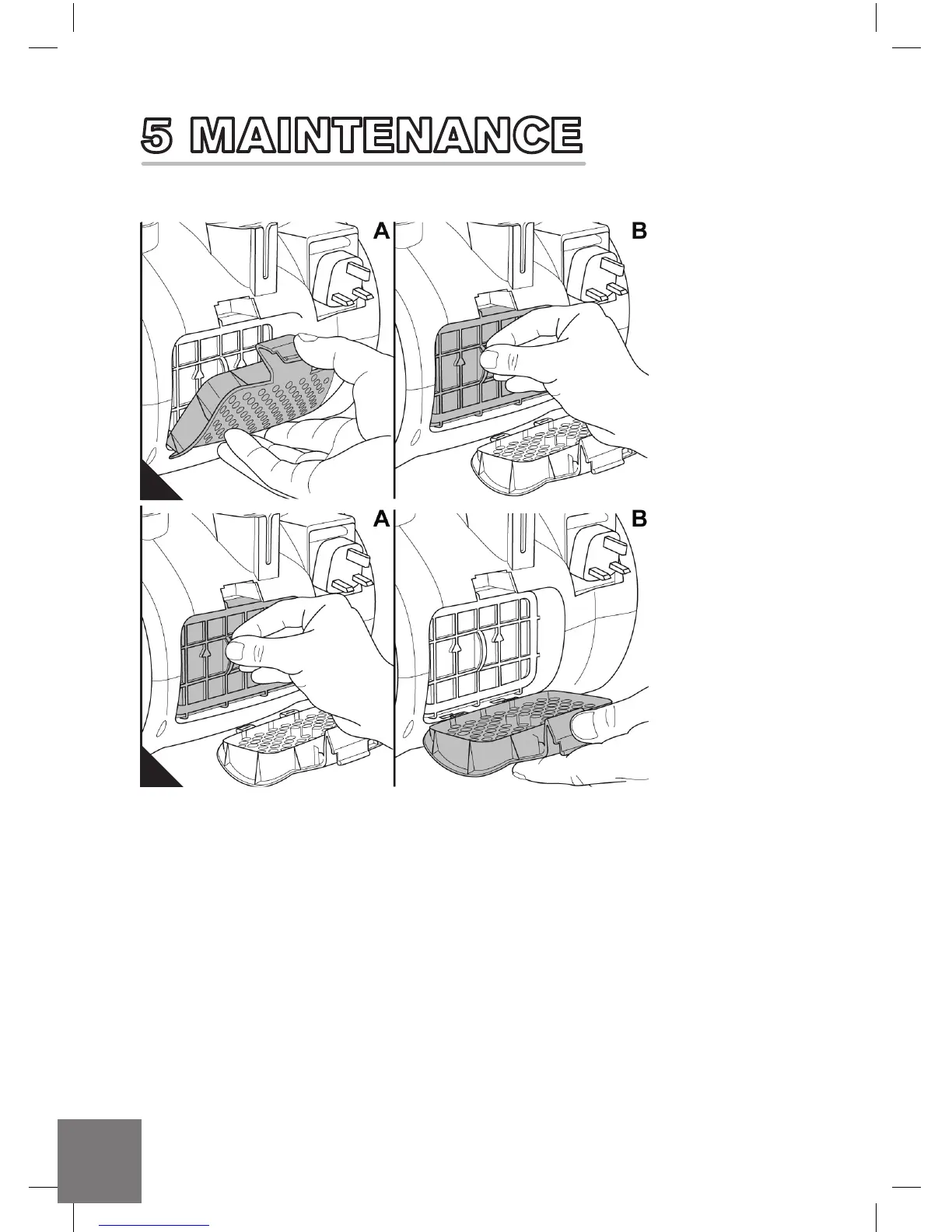
5.3 CLEANING THE POST MOTOR FILTER
n Check the post-motor filter every time
you clean the pre-motor filter, > Chapter
5.2, 'Cleaning the dirt container
and pre-motor filter'.
1. Switch off the machine, > Chapter 4.3,
'Switching off'.
2. Push the release catch of the post-motor
filter cover down (Fig. 12/A) and open the
post-motor filter cover.
3. Remove the post-motor filter (Fig. 12/B).
4. Check the post motor filter for
any discolouration.
5. If the post motor filter is heavily
discoloured replace.
6. If the post-motor filter is damaged,
replace it, > Chapter 5.4, 'Spare parts
and accessories'.
7. Re-fit the post-motor filter (Fig. 13/A).
8. Attach the post-motor filter cover at the
bottom side first (Fig. 13/B) before folding
it up firmly. It will audibly snap into place.
12
12
13
DD_Real Power M28_OUTPUT-RK.indd 12 26/03/2015 10:48



 To Next Page